
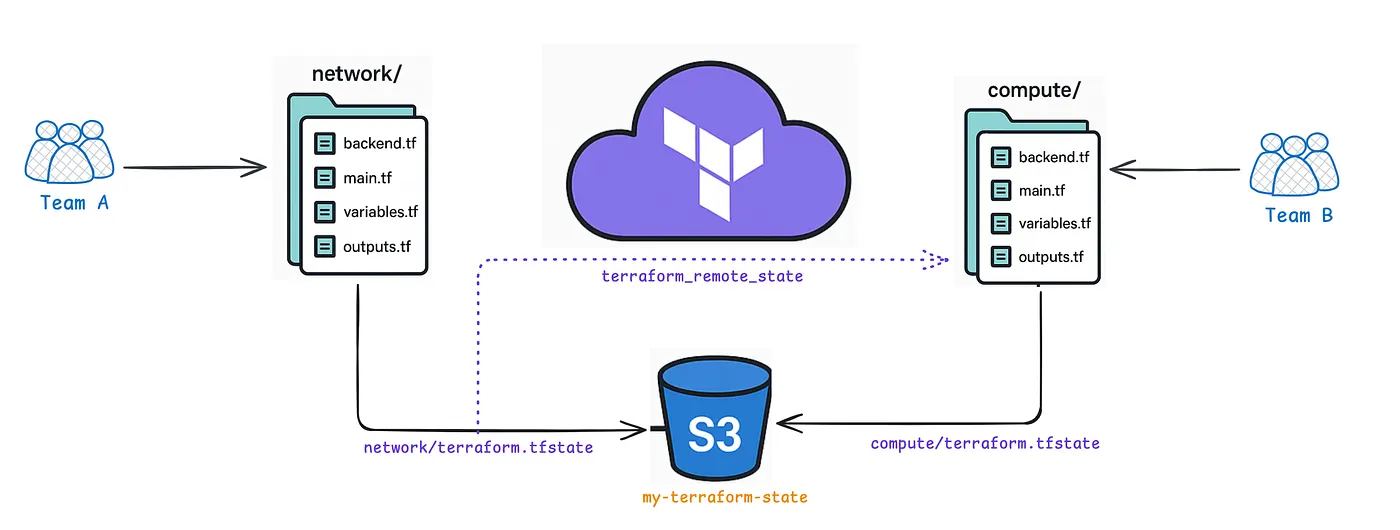
Managing infrastructure at scale with Terraform often means dealing with increasingly large state files. By splitting these files across multiple backends, you can significantly reduce the blast radius of potential state corruption, enhance performance, and allow different teams to work concurrently on distinct parts of your infrastructure.
1. Separate Terraform Configurations
The most straightforward way to split state files is to break your Terraform code into multiple configurations. Each configuration is maintained in its own directory or repository, with its own backend configuration. This separation ensures that each module or component maintains a distinct state file.
Example: Splitting Network and Compute Resources
Network Module:
Create a directory for your network-related resources and configure its backend as follows:
terraform {
  backend "s3" {
    bucket         = "my-terraform-state"
    key            = "network/terraform.tfstate"
    region         = "us-east-1"
    dynamodb_table = "terraform-locks"
    encrypt        = true
  }
}

resource "aws_vpc" "main" {
  cidr_block = "10.0.0.0/16"
  tags = {
    Name = "network-vpc"
  }
}
Compute Module:
In another directory dedicated to compute resources, use a distinct backend key:
terraform {
  backend "s3" {
    bucket         = "my-terraform-state"
    key            = "compute/terraform.tfstate"
    region         = "us-east-1"
    dynamodb_table = "terraform-locks"
    encrypt        = true
  }
}

resource "aws_instance" "app_server" {
  ami           = "ami-0abcdef1234567890"
  instance_type = "t3.micro"
  tags = {
    Name = "app-server"
  }
}
Key Benefits:
- Isolation: Segregates the network and compute infrastructures, ensuring changes in one do not affect the other.
- Performance: Smaller state files load more quickly, reducing the risk of corruption.
- Team Collaboration: Different teams can work in parallel on distinct modules without interference.
2. Sharing Data Across Configurations with terraform_remote_state
Splitting your Terraform code into multiple configurations can result in scenarios where one module needs data from another. Terraform provides the terraform_remote_state data source to allow cross-configuration data sharing. This method maintains modularity while ensuring that critical outputs are available where needed.
Example: Referencing Network Outputs in the Compute Module
Network Module (outputs.tf):
output "vpc_id" {
  value = aws_vpc.main.id
}
Compute Module (main.tf):
data "terraform_remote_state" "network" {
  backend = "s3"
  config = {
    bucket         = "my-terraform-state"
    key            = "network/terraform.tfstate"
    region         = "us-east-1"
    dynamodb_table = "terraform-locks"
    encrypt        = true
  }
}

resource "aws_instance" "app_server" {
  ami           = "ami-0abcdef1234567890"
  instance_type = "t3.micro"
  subnet_id     = data.terraform_remote_state.network.outputs.vpc_id
  tags = {
    Name = "app-server"
  }
}
Key Benefits:
- Decoupling: Each module is independent yet capable of exchanging necessary data.
- Modularity: Keeps your infrastructure components clearly isolated while still interconnected via outputs.
3. Directory Structure for Modular Terraform Configurations
Below is an example directory structure that illustrates how you might organize your Terraform configurations into separate modules for network and compute with distinct backend configurations. This structure helps clarify how large state files can be split into multiple backends while keeping the code modular and maintainable.
terraform/
├── network/
│   ├── backend.tf         # Contains the backend configuration for S3/DynamoDB state
│   ├── main.tf            # Defines network resources (e.g., VPC, subnets)
│   ├── outputs.tf         # Exports outputs (like VPC ID) for remote state sharing
│   └── variables.tf       # Input variables for network configuration
├── compute/
│   ├── backend.tf         # Contains the backend configuration for S3/DynamoDB state
│   ├── main.tf            # Defines compute resources (e.g., EC2 instances)
│   ├── variables.tf       # Input variables for compute configuration
│   └── outputs.tf         # Exports compute-specific outputs if needed
|...
4. Organizing with Terraform Workspaces
While workspaces are typically used for separating environments (e.g., development, staging, production), they can also be applied to manage state separation. However, workspaces primarily serve environment isolation purposes rather than splitting by infrastructure components.
Example: Using Workspaces for Environment Isolation
# Create a new workspace for production
terraform workspace new production

# Select the production workspace
terraform workspace select production

# Execute your Terraform commands within the production workspace
terraform apply
Key Consideration:
- Workspaces are ideal for isolating environments, but for component-based separation, managing multiple configurations with distinct backends is generally preferred.
Final Thoughts
By splitting large state files into multiple backends, you:
- Improve Reliability: Each module’s state is isolated, reducing the risk of widespread state corruption.
- Enhance Performance: Smaller, modular state files are faster to load and manage.
- Facilitate Collaboration: Separate teams can work in parallel on independent components of the infrastructure.
Adopt these strategies gradually as you refactor your Terraform codebase. Starting with distinct modules and transitioning to multi-backend architectures with terraform_remote_state can lead to more manageable, scalable, and resilient infrastructure deployments.
If you enjoyed this article, please show your support by clapping and following for more content like this!
Terraform State Management Terraform Remote State Terraform Multiple Backends Terraform State File Amazon S3 Backend Terraform Architecture Infrastructure as Code Terraform Best Practices Large Terraform Deployments Terraform State Isolation Terraform Scalability DevOps Automation
