
Introduction
When managing infrastructure as code (IaC) using Terraform, one of the most critical architectural decisions is how you structure your code repositories. Should you go with a single repository using environment-based folders, a multi-repo setup with clear access boundaries, or adopt a multi-branch strategy aligned with GitOps principles?
Each approach has its strengths and trade-offs — and choosing the right one depends heavily on your team’s size, workflow maturity, and compliance needs.
In this article, I’ll explore three commonly used Terraform codebase strategies to help you decide what fits best for your organization.
Environment-Based Folder Structure
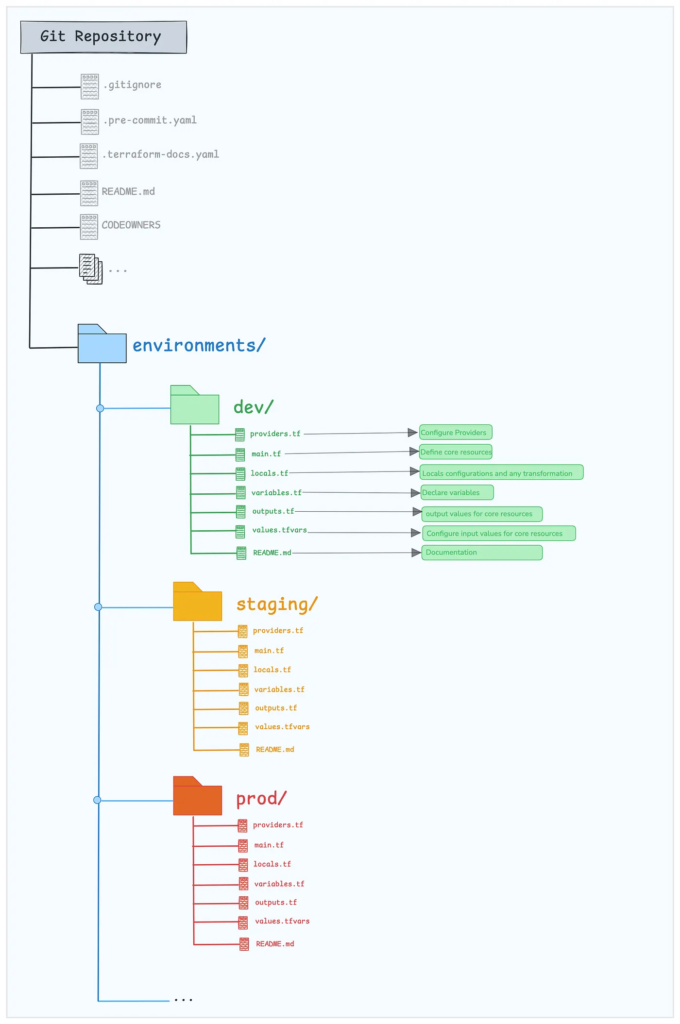
In this approach, a single repository contains folders for each environment like dev, stage, and prod. Each folder holds environment-specific Terraform configurations
Pros
- Clear separation of environments
- Each environment (dev, staging, prod) has its own directory and variable files (.tfvars), reducing the risk of accidental changes across environments.
- The use of values.tfvars separate for each environment , which allows for customization without altering other environment logic.
Cons
- Code duplication across environments i.e. every new environment requires duplicate files like main.tf, variables.tf, etc., which can lead to some repetition.
- Potential inconsistencies between environments.
- Granular access control is hard inside the same repo. Ex: Restricting developers to just dev/ folder isn’t easy in GitHub or GitLab or BitBucket.
- Too many folders in one repo makes project messy over time. Ex: An enterprise with 10+ teams finds navigation and PR reviews tedious.
Multi-Branch Strategy (Single Repo with dev, stage, prod/main branches)
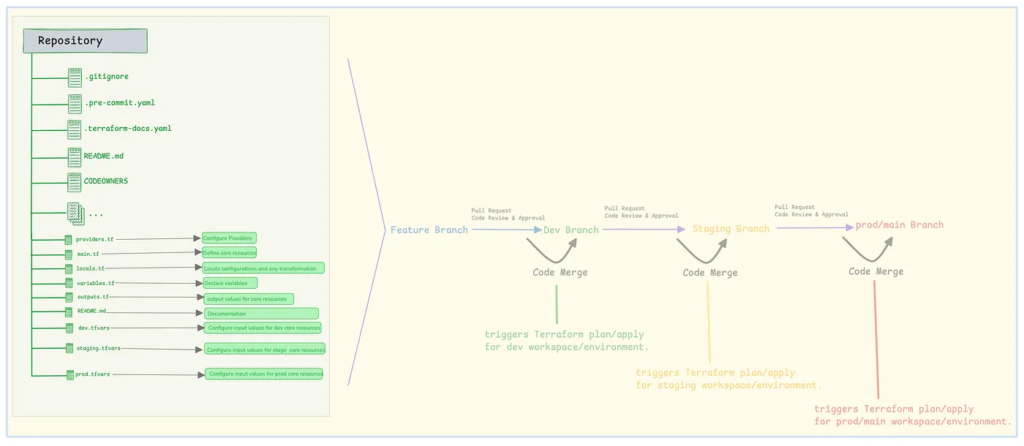
A single repository uses separate branches like dev, stage, and main or prod to represent different environments. Changes are promoted through pull requests, aligning with GitOps workflows.
Pros
- Single codebase
- Controlled code promotion i.e. a branching model (e.g., dev, stage, prod/main) allows changes to be promoted through pull requests, rather than copied across folders. Ex: A QA team tests stage, then approves PR for production release.
- Git branches align naturally with GitOps practices, which many organizations adopt for cloud-native environments.
- Code flows through environments via CI/CD pipelines, making the promotion explicit, auditable, and controlled. This is especially beneficial in regulated or high-availability production environments.
- Centralized configurations (with branching) make it easier to refactor logic without hunting through multiple folders.
- Git tracks env-specific changes across branches. You can cherry-pick bug fixes or revert to previous commit cleanly.
Cons
- Higher barrier for beginners
- Harder to isolate parallel changes
- Requires strict discipline to enforce policies to prevent direct commits to stage or prod i.e. Accidental push to prod branch applies untested infra.
- Chance of Git pollution where it is hard to trace where a change originated if branching isn’t clean. Ex: Hot fixes applied directly in prod branch but not merged back to dev.
Multi-Repo Strategy
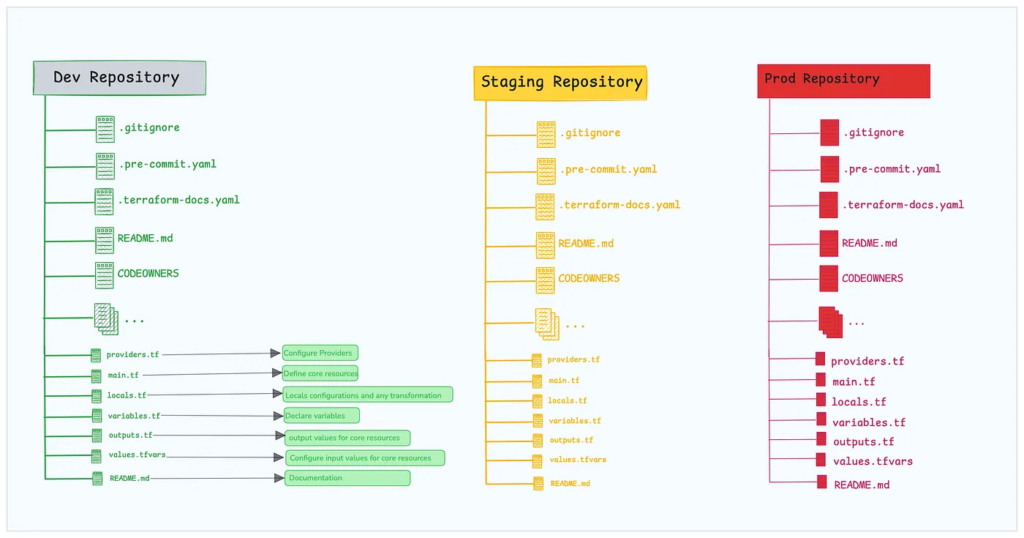
Here, each environment (e.g., dev, stage, prod/main) has its own Git repository.
Pros
- Complete isolation of environments reducing blast radius. Ex: Different AWS accounts and secrets per repo prevent cross-environment leaks.
- Independent versioning and access i.e. Teams can own environments without stepping on each other. Ex: DevOps owns prod, developers own dev, enabling better governance.
- RBAC at repo level is easier i.e. You can make prod read-only for most contributors on GitHub.
- Independent CI/CD — Changes in dev don’t trigger prod builds which makes faster builds and more targeted pipeline runs.
Cons
- Separate repository per environment.
- Same code repeated in each repo.
- Lack of shared code between environments.
- Environments might become inconsistent over time. Ex: vpc.tf is updated in dev but not in staging/prod, leading to drift.
- Increases CI/CD overhead i.e. Each repo needs its own CI/CD pipeline. Ex: GitHub Actions/Pipelines must be duplicated or centralized in a separate repo.
Recommended Strategy
Environment-Based Folder Structure
For startups or small teams managing just a few environments, keeping all Terraform code in a single repository with separate folders for dev, stage, and prod keeps things simple and centralized. It reduces the complexity of CI/CD and allows quicker iteration.
Example: A 5-member SaaS team uses /environments/dev, /prod folders in one GitHub repo to manage all AWS infra without duplicating code.
Multi-Repo Strategy
Enterprises often require strict access controls, auditability, and team separation. Using separate repositories per environment (or even per team or region) enables clean permission boundaries, better compliance, and easier team ownership.
Example: A banking company has terraform-prod, terraform-dev, and terraform-networking repos with CI/CD permissions locked down per team using GitLab and Azure AD roles.
Multi-Branch Strategy
When teams follow GitOps practices and need to promote changes via pull requests from one environment to another (dev → stage → prod), a branch-based structure works well. Each branch maps to an environment, and merges represent code promotion.
Example: A retail tech team uses main, stage, and prod branches in Bitbucket, with each merge triggering Argo CD to apply Terraform in the corresponding AWS account.
Have you used any of these strategies — or a hybrid approach? Share your experience, thoughts, or questions in the comments. I’d love to hear what’s worked (or not) for your team!
Enjoyed reading this article?
If you found it helpful or insightful, consider following or more DevOps, Terraform, and cloud infrastructure content. Your support keeps me motivated to share more hands-on experiences and practical guides. Thanks for reading!
