
Before the introduction of ephemeral blocks in Terraform 1.10 and write-only arguments in Terraform 1.11, managing sensitive data such as passwords, API keys, and tokens posed significant security challenges.
Challenges in Handling Sensitive Data Pre-Terraform 1.10
- State File Exposure: Sensitive information was stored in plaintext within Terraform’s state files (terraform.tfstate). This meant that anyone with access to these files could potentially view confidential data.
- Plan File Vulnerabilities: During the planning phase, Terraform would display sensitive values in the plan output, increasing the risk of accidental exposure.
- Limited Control Over Data Persistence: There was no built-in mechanism to prevent Terraform from storing certain values, making it challenging to manage secrets securely.
- Complex Workarounds: To mitigate these issues, practitioners often resorted to external secret management systems or complex scripting, which added operational overhead and complexity.
Enhancements with Ephemeral Blocks and Write-Only Arguments
The introduction of ephemeral blocks and write-only arguments addressed these challenges:
- Ephemeral Blocks: Used for provider-computed data that should not appear in the Terraform state or plan (e.g., connection info, temporary tokens).
- Write-Only Arguments: Enable the passing of sensitive data to resources without storing them in state or plan files. This ensures that secrets are used during resource creation or updates but are not persisted.
Ephemeral Resources
Ephemeral resources are available in Terraform v1.10 and later.
Introduction
Terraform’s ephemeral resources introduce a new resource model designed for short-lived, use-and-dispose interactions with external systems. Instead of persisting state, Terraform opens an ephemeral resource only when its attributes are needed — such as fetching a one-time secret from Vault or generating a temporary password via AWS Secrets Manager — and closes it immediately after use, ensuring that no sensitive data is ever recorded in the state or plan artifacts.
Key Characteristics
- Non-persisted Lifecycle: Values produced by ephemeral blocks are never written to the state or plan files, mitigating the risk of secret leakage.
- On-Demand Opening/Closing: Terraform handles ephemeral resources by invoking their provider’s Open() and Close() hooks at runtime, aligning with Vault leases or AWS credential lifecycles.
- Scoped References: An ephemeral resource’s name is strictly module-local; it cannot be interpolated into remote state or shared across module boundaries, preserving its ephemeral semantics.
By integrating ephemeral resources, Terraform core enables a “just-in-time” secrets paradigm — platform engineers can fetch and consume sensitive data securely, without leaving residual traces in state files.
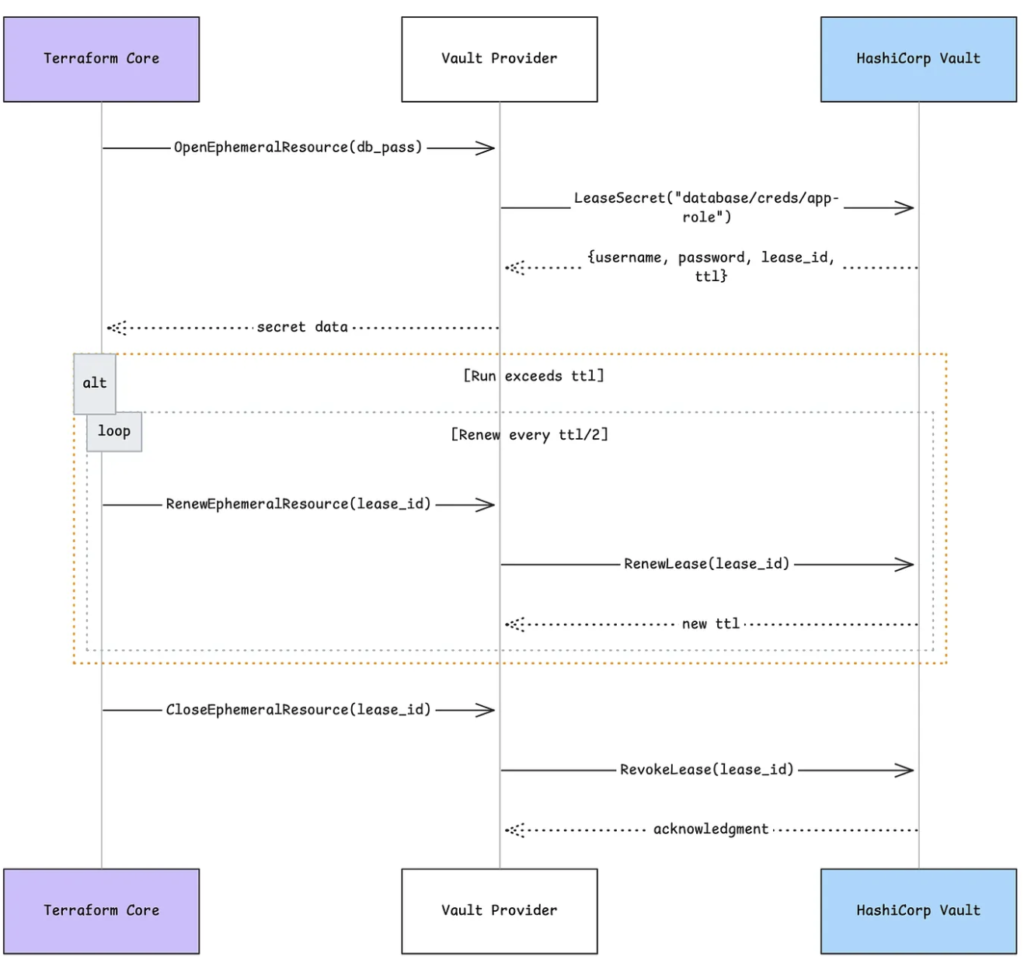
Lifecycle Steps
The lifecycle of an ephemeral resource is different from resources and data sources. When Terraform provisions ephemeral resources, it performs the following steps:
Open (Acquire)
When Terraform needs the value, it opens the ephemeral resource by calling the provider’s OpenEphemeralResource RPC — for example, Terraform opens a Vault secret block and Vault returns a leased credential. This call happens during planning or applying, and no data is stored in the Terraform state or plan files.
Renew (Keep Alive, Optional)
If the run requires the secret beyond its server-enforced TTL, Terraform will periodically invoke the provider’s RenewEphemeralResource RPC. In the Vault case, this results in calls to Vault’s lease-renewal API to extend the secret’s lifetime without interruption.
Close (Revoke)
Once all dependent resources have been provisioned, Terraform calls the provider’s CloseEphemeralResource RPC to explicitly end the lease. Vault then revokes the credential immediately, ensuring no residual access remains.
Real-World Use Case: Vault-Backed Database Password
Imagine you need a one-time password for an RDS database during provisioning:
Declare an ephemeral Vault resource to fetch a new password:
ephemeral "vault_generic_secret" "db_pass" {
  path = "database/creds/pgsql"
}Open: Terraform calls Vault, which returns a username and password lease pair.
Use: The AWS provider creates an RDS instance, passing in ephemeral.vault_generic_secret.db_pass.data[“password”] as the master password.
provider "postgresql" {
  host     = ephemeral.vault_generic_secret.db_pass.data["host"]
  port     = ephemeral.vault_generic_secret.db_pass.data["port"]
  username = ephemeral.vault_generic_secret.db_pass.data["username"]
  password = ephemeral.vault_generic_secret.db_pass.data["password"]
}Renew: If creation takes longer than Vault’s default TTL (e.g., 1h), Terraform asks Vault to renew the lease.
Close: After RDS is up and the password has been applied, Terraform closes the Vault lease, revoking the credential
Sequence Diagram
Referencing Ephemeral Resources
Ephemeral resources in Terraform are designed to be transient and isolated within a specific execution context. As such, you can only reference them in a limited set of supported contexts. Attempting to use them outside these scopes will result in a validation error.
Valid Contexts for Referencing Ephemeral Resources
- Within another ephemeral resource block
Allows chaining or composing ephemeral behaviors (e.g., using a token from one Vault secret to fetch another).
ephemeral "vault_generic_secret" "app_token" {
  path = "auth/token/create"
}

ephemeral "vault_generic_secret" "service_creds" {
  path = "database/creds/app-role"
  data = {
    token = ephemeral.vault_generic_secret.app_token.data.client_token
  }
}
First, you fetch a Vault client token. Then you use that token to request database credentials in a second ephemeral block.
- In locals blocks
Useful for transforming or structuring ephemeral values before use within the module.
ephemeral "vault_generic_secret" "db_creds" {
  path = "database/creds/app-role"
}

locals {
  db_password = ephemeral.vault_generic_secret.db_creds.data.password
  db_user     = ephemeral.vault_generic_secret.db_creds.data.username
  db_conn     = "postgres://${local.db_user}:${local.db_password}@${var.db_host}:${var.db_port}/${var.db_name}"
}
You pull out the username/password into locals and construct a connection string without ever storing secrets in state.
- In ephemeral variables (ephemeral_variable blocks)
Lets you assign and reuse ephemeral values like a temporary secret or token across multiple resources during the apply phase.
ephemeral_variable "api_key" {
  type = string
  default = ephemeral.vault_generic_secret.api_key.data.key
}

ephemeral "vault_generic_secret" "api_key" {
  path = "secret/data/api"
}
api_key is declared as an ephemeral variable, sourcing its default from the Vault secret.
- In ephemeral outputs (ephemeral_output blocks)
Outputs ephemeral values only during the run without persisting them in the Terraform state.
ephemeral "vault_generic_secret" "deploy_token" {
  path = "secret/data/deploy"
}

ephemeral_output "token" {
  value = ephemeral.vault_generic_secret.deploy_token.data.token
  description = "One-time deployment token from Vault"
}
You retrieve a deployment token and output it for use by downstream tooling, but it never lands in the Terraform state.
- In
providerblocks
For example, dynamically injecting credentials fetched from Vault into provider configurations (e.g., AWS or Kubernetes providers).
ephemeral "vault_generic_secret" "aws_creds" {
  path = "aws/creds/terraform-role"
}

provider "aws" {
  region     = var.aws_region
  access_key = ephemeral.vault_generic_secret.aws_creds.data.access_key
  secret_key = ephemeral.vault_generic_secret.aws_creds.data.secret_key
}
AWS provider is configured on the fly using Vault’s dynamic AWS credentials, without persisting them.
- Inside provisioner or connection blocks
Ideal for passing one-time secrets or SSH keys to remote-exec provisioners securely during resource bootstrapping.
resource "aws_instance" "app" {
  # ...

  connection {
    type        = "ssh"
    host        = self.public_ip
    user        = "ubuntu"
    password    = ephemeral.vault_generic_secret.ssh_pass.data.value
  }

  provisioner "remote-exec" {
    inline = [
      "echo Deploying with secret $PASSWORD",
    ]

    environment = {
      PASSWORD = ephemeral.vault_generic_secret.ssh_pass.data.value
    }
  }
}

ephemeral "vault_generic_secret" "ssh_pass" {
  path = "ssh/creds/deployer"
}
You fetch a one-time SSH password from Vault and use it to connect and provision the EC2 instance, ensuring it’s never stored.
Key Takeaways
- No State Pollution: Ephemeral values never touch state or plan files.
- Just-In-Time: Secrets are fetched only when needed and revoked immediately after use.
- Security First: This model is ideal for one-time tokens, temporary credentials, and reducing blast radius.
Write-Only Argument
write-only arguments are available in Terraform v1.11 and later.
Introduction
Terraform 1.11 introduced write-only arguments to enhance the security of handling sensitive data in infrastructure configurations. These arguments allow you to pass confidential information — such as passwords, API keys, or tokens — to resources during creation or updates without storing them in Terraform’s state or plan files. This ensures that sensitive values are not exposed or persisted beyond the necessary operation.
Use Case: Securely Provisioning a Database with a Temporary Password
Consider a scenario where you need to provision an AWS RDS database instance with a password that should not be stored in Terraform’s state for security reasons. Using a combination of an ephemeral resource to generate the password and a write-only argument to apply it ensures the password remains confidential.
ephemeral "random_password" "db_password" {
  length           = 16
  override_special = "!#$%&*()-_=+[]{}<>:?"
}

resource "aws_db_instance" "example" {
  instance_class      = "db.t3.micro"
  allocated_storage   = 5
  engine              = "postgres"
  username            = "example"
  skip_final_snapshot = true
  password_wo         = ephemeral.random_password.db_password.result
  password_wo_version = 1
}
In this configuration:
- The random_password ephemeral resource generates a temporary password.
- The password_wo write-only argument applies this password to the aws_db_instance resource.
- The password_wo_version helps track changes to the password, prompting updates when incremented.
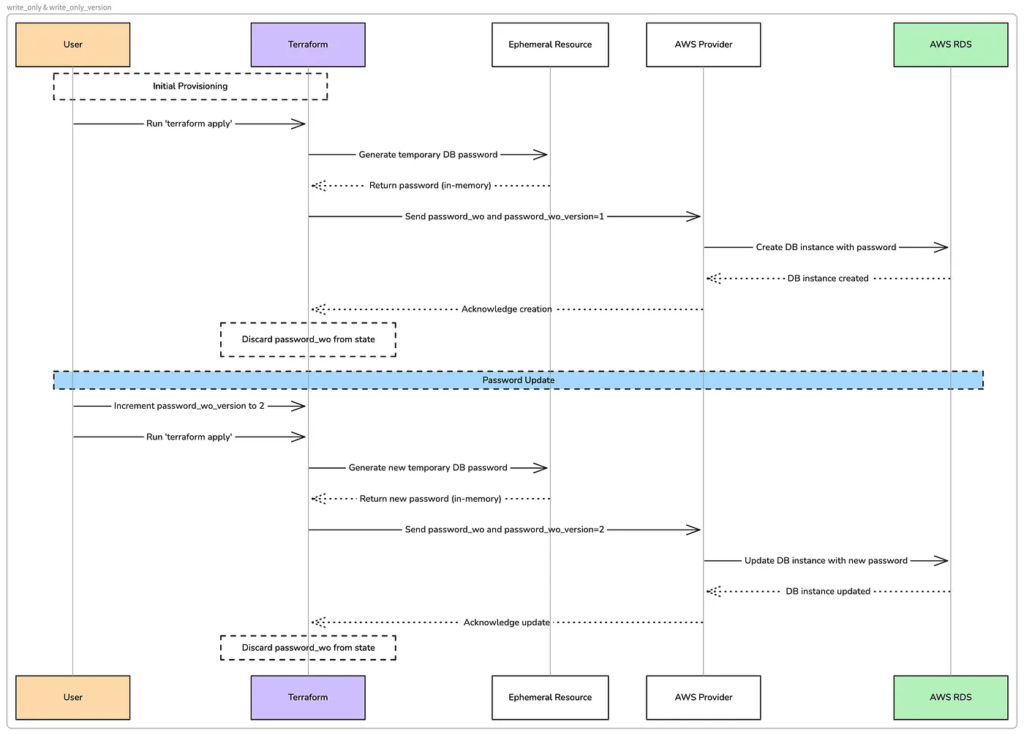
During a Terraform operation, the provider uses the password_wo value to create the database instance, and then Terraform discards that value without storing it in the plan or state file.
Note: Write-only arguments accept both ephemeral and non-ephemeral values. However, HashiCorp Terraform recommend using write-only arguments for passing ephemeral values to resources.
Update write-only arguments with versions
Terraform does not store write-only arguments in state files, so Terraform
- Has no way of knowing if a write-only argument value has changed. Because Terraform cannot track write-only argument values, it sends write-only arguments to the provider during every operation.
- Cannot create plan diffs for write-only arguments. However, providers typically include version arguments alongside write-only arguments. Terraform stores version arguments in state, and can track if a version argument changes.
For example, the aws_db_instance resource has an accompanying password_wo_version argument for the password_wo write-only argument:
resource "aws_db_instance" "test" {
  instance_class      = "db.t3.micro"
  allocated_storage   = "5"
  engine              = "postgres"
  username            = "example"
  skip_final_snapshot = true
  password_wo         = "old-password-here"
  password_wo_version = 1
}
The provider uses the write-only argument value when creating the aws_db_instance resource and Terraform stores the password_wo_version argument value in state.
To trigger an update of a write-only argument, increment the version argument’s value in your configuration:
resource "aws_db_instance" "main" {
  instance_class      = "db.t3.micro"
  allocated_storage   = "5"
  engine              = "postgres"
  username            = "example"
  password_wo         = "new-password-here"
  password_wo_version = 2
}
When you increment the password_wo_version argument, Terraform notices that change in its plan and notifies the aws provider. The aws provider then uses the new password_wo value to update the aws_db_instance resource.
Benefits
- Enhanced Security: Sensitive information like passwords is not persisted in Terraform’s state or plan files.
- Controlled Updates: By using password_wo_version, you can explicitly trigger updates to sensitive data without relying on Terraform to detect changes in write-only arguments.
- Compliance: Aligns with best practices for handling confidential information in infrastructure as code.
- Flexibility: Supports both ephemeral and static values for resource configuration.
- Provider Compatibility: Supported by providers like AWS for resources such as aws_db_instance.
If you found this article insightful, consider following for more content on Terraform and infrastructure best practices. Sharing this piece with your network can help others discover valuable information, and your support means a lot!
Have thoughts, questions, or experiences to share? Drop a comment below — I’d love to hear from you and engage in meaningful discussions.
