
Remember how you started with AWS or the cloud? It felt overwhelming at first, but small daily steps got you there. Learning AI works the same way. Commit to a little bit each day, stay consistent, and before you know it, the pieces start falling into place. Let’s take that first step together.
AI infrastructure
AI infrastructure is the backbone that makes artificial intelligence actually work in the real world. Let me break it down visually,
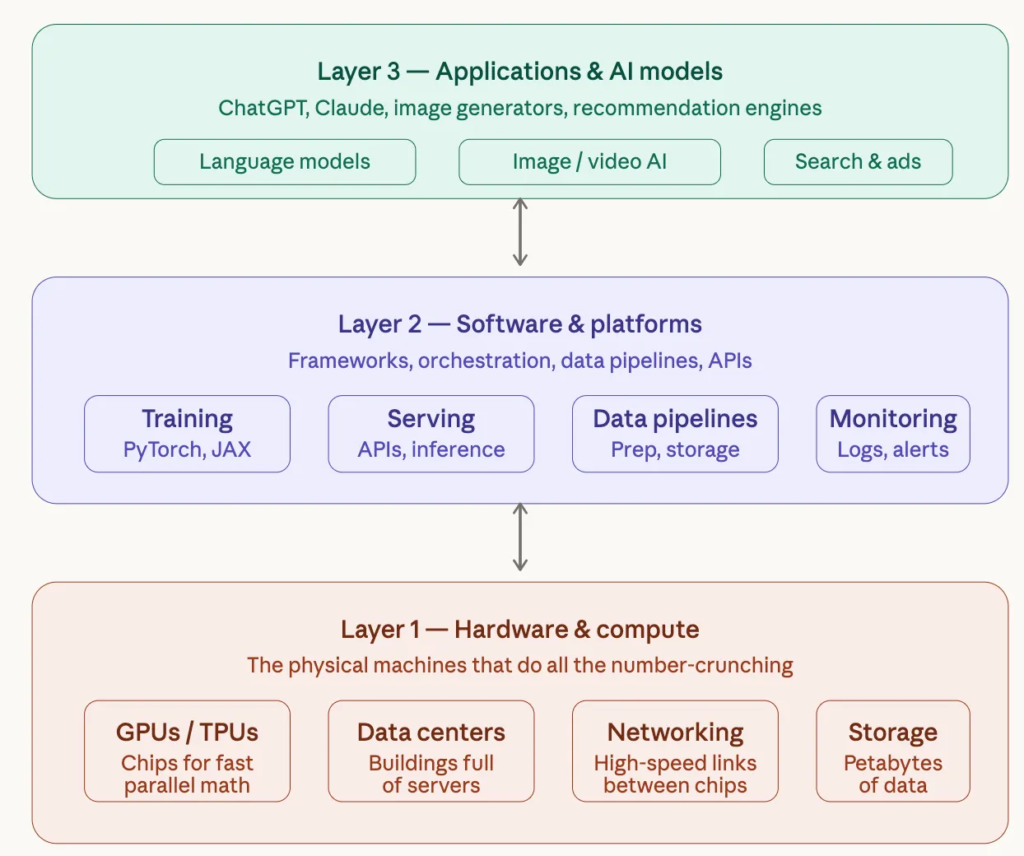
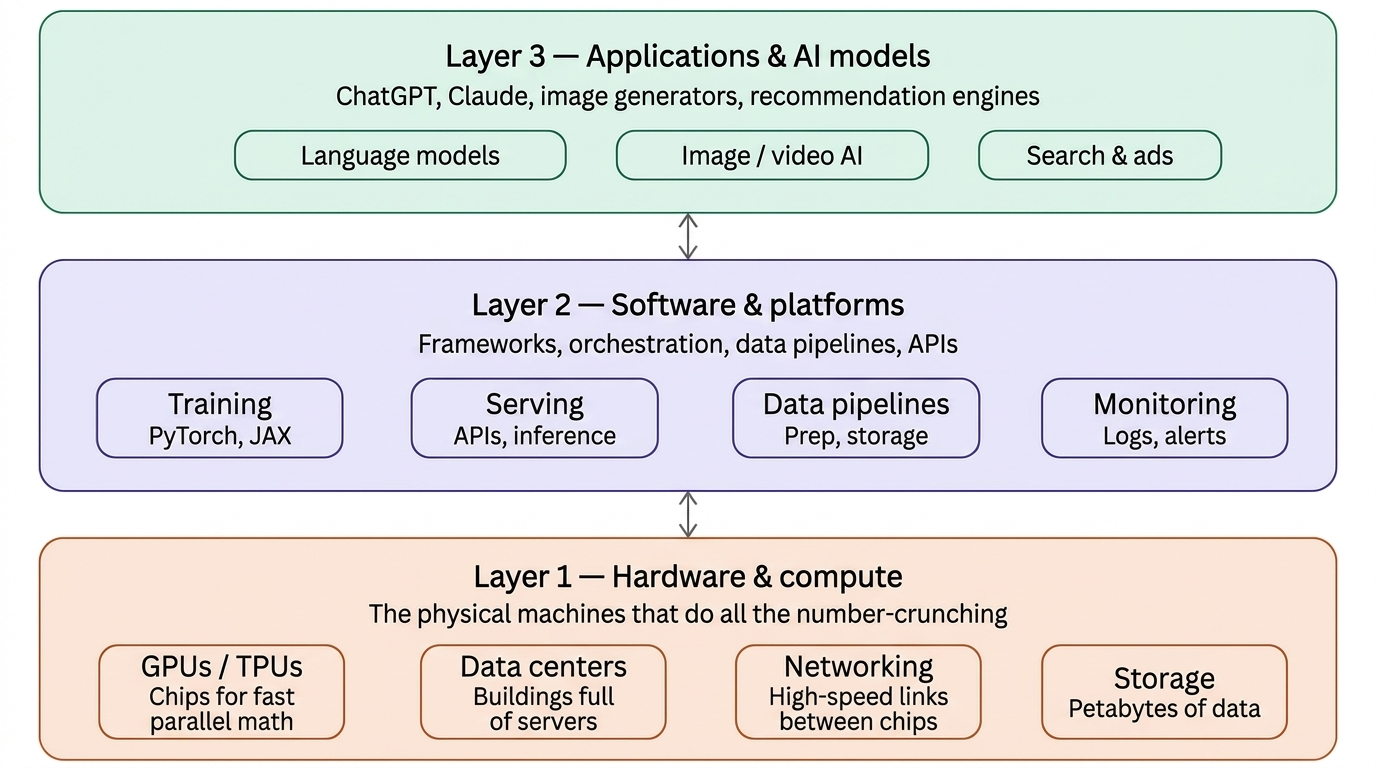
Think of AI infrastructure as three stacked layers — the raw computing power at the bottom, the software and tools in the middle, and the AI models and applications you interact with at the top.
Here’s what each layer means in plain terms:
Layer 1 — Hardware (the foundation)
This is the physical stuff. AI requires enormous amounts of computation — multiplying millions of numbers together, billions of times. Special chips called GPUs (Graphics Processing Units) and TPUs (Tensor Processing Units) are designed to do this kind of math incredibly fast. They live in massive buildings called data centers, connected by ultra-fast cables, with huge amounts of storage for data.
Layer 2 — Software and platforms (the plumbing)
Raw hardware does nothing without software to coordinate it. This layer includes frameworks like PyTorch (used to build and train AI models), tools to serve those models to users via APIs, data pipelines to clean and feed data into training, and monitoring systems to catch problems.
Layer 3 — AI models and applications (what you see)
This is what most people interact with —ChatGPT, Claude, Google Gemini, image generators, recommendation systems, and search engines. These sit on top of the two layers below.
AI infrastructure is expensive, energy-intensive, and hard to build. A single AI training run for a large model can cost tens of millions of dollars and consume as much electricity as thousands of homes. Companies like Google, Microsoft, Amazon, and Nvidia are investing hundreds of billions of dollars building this infrastructure — because whoever controls the compute, largely controls the future of AI.
What a data center looks like
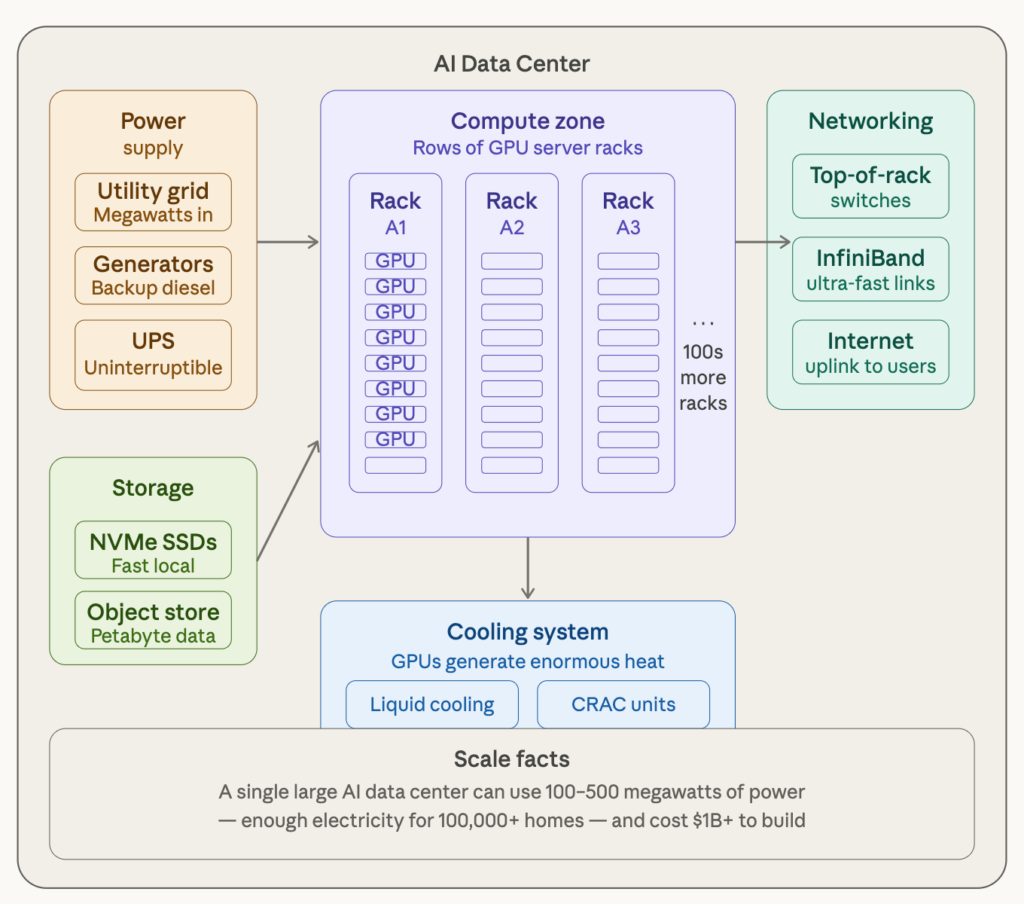
Here’s what’s happening inside a real AI data center:
- Server Racks are tall metal cabinets — about 2 meters high — stacked with GPU-loaded servers. A single rack can hold 8–16 powerful GPUs. A large data center might have thousands of racks arranged in long rows, like a library of shelves but for computers.
- Power is the biggest challenge. AI chips are power-hungry. A single GPU can draw so much of watts. A large data center needs its own substation connection to the electricity grid, plus diesel generators ready to kick in if the grid fails.
- Cooling is the second biggest challenge. All that electricity turns into heat. Data centers use a combination of precision air conditioning units (called CRAC units) and increasingly, liquid cooling — where cold water pipes run directly alongside or through the chips to carry heat away.
- Networking is what ties it all together. GPUs don’t just work alone — they need to communicate with each other constantly during AI training. Special high-speed networking technology connects thousands of GPUs so they can act like one giant brain. The speed of this network is critical — a slow network makes even the fastest GPUs wait.
- Storage holds the raw data (training datasets, model weights). This can be petabytes in size — one petabyte is one million gigabytes.
The biggest players building these today are Google, Microsoft, Meta, Amazon. They’re spending hundreds of billions of dollars racing to build more of this capacity.
How GPU works (Very High Level)
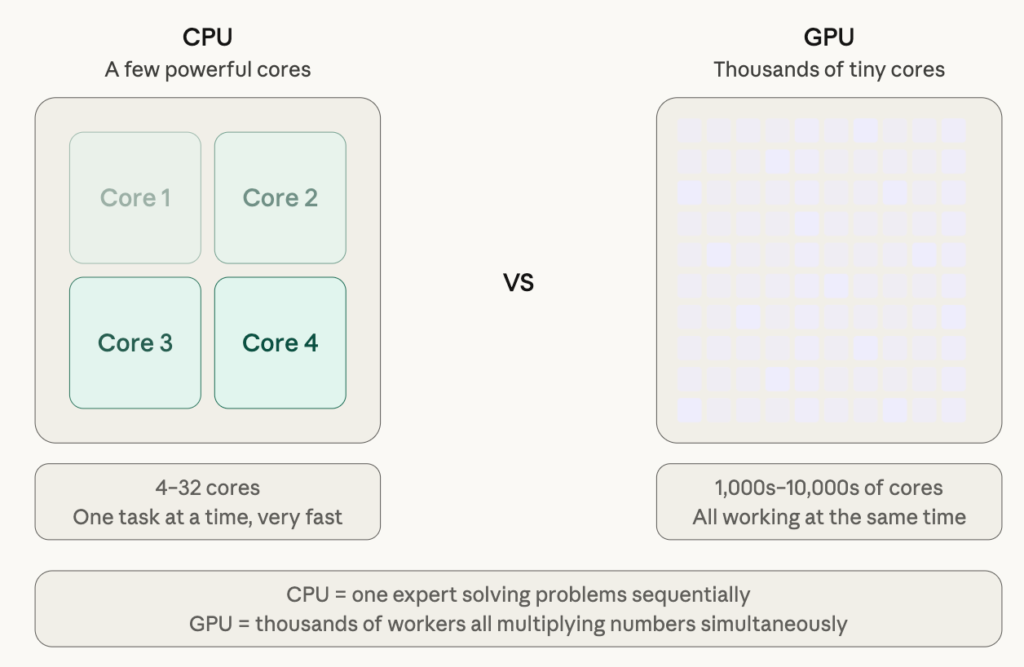
The key idea behind a GPU is this: imagine two different workers.
- A CPU (the chip in your laptop) is like one brilliant expert who can solve any problem — but one at a time.
- A GPU is like having thousands of simple workers all doing the same task simultaneously. For AI, that’s perfect, because training a model is essentially doing the same math operation (multiply, add) billions of times.
Why GPUs and not regular CPUs?
CPUs are great at complex, varied tasks — running your browser, handling logic, responding to unpredictable inputs. But AI training is the opposite: simple math, done identically, billions of times.
GPUs were originally built for the same reason — rendering graphics is also repetitive parallel math (one calculation per pixel). Researchers discovered in the early 2010s that the same chip design was perfect for AI.
NVIDIA and Google
- Nvidia’s H100 GPU — the most sought-after AI chip in the world right now — can do about 2,000 trillion operations per second for AI workloads. A modern laptop CPU does roughly 1–2 trillion. That’s roughly a 1,000x difference for AI tasks.
- Google has built custom chips called TPUs (Tensor Processing Units) designed purely for AI math, with no legacy graphics baggage. They’re even more efficient for AI workloads but only work inside Google’s ecosystem.
Key layers of AI infrastructure
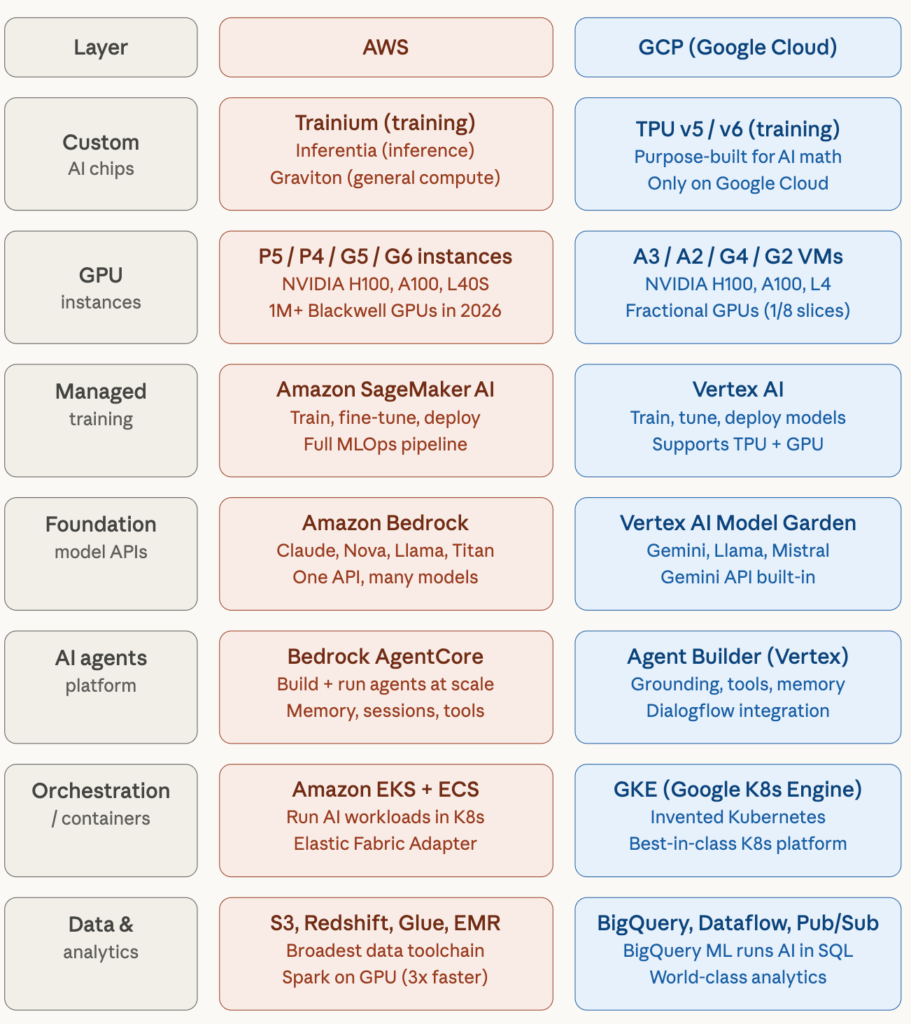
Here’s what each row means in plain terms, and what makes each cloud distinctive:
Custom AI chips — Both clouds have gone beyond renting Nvidia GPUs and built their own chips.
- AWS’s Trainium accelerators are used in large-scale AI environments,
- including Project Rainier — one of the largest operational AI clusters in the world, which Anthropic uses to train models.
- Google’s TPUs have been around longer and power Google Search, YouTube, and Gmail internally, giving them a big head start in chip maturity.
GPU instances
- Starting in 2026, AWS plans to add more than 1 million Nvidia GPUs including Blackwell and Rubin architectures across its global cloud regions, and claims the broadest collection of Nvidia GPU-based instances of any cloud provider.
- GCP counters with a unique innovation: fractional G4 VMs that let customers use smaller GPU slices — including 1/2, 1/4, and 1/8 GPU options — to better match infrastructure to workloads like inference, rendering, and streaming.
Managed training
- Amazon SageMaker AI is the most mature platform for enterprise ML teams, covering everything from data labeling to model deployment.
- Google’s Vertex AI is tightly integrated with BigQuery and the Gemini model family, making it very smooth if your data already lives in Google Cloud.
Foundation model APIs
- Amazon Bedrock is AWS’s fully managed service for building generative AI applications, giving access to leading AI models — including Claude, Amazon Nova, Llama, and Titan — through a single API, without needing to train from scratch.
- GCP’s equivalent is Vertex AI Model Garden, with Gemini as its flagship model deeply integrated throughout.
AI Agents — This is the newest and hottest battleground.
- Amazon Bedrock AgentCore is a fully managed agent platform built to help organizations build, deploy, operate, and scale AI agents in production, with enterprise-grade security, observability, and flexibility.
- GCP offers Agent Builder inside Vertex AI with strong grounding and tool-use capabilities.
Orchestration
- AWS’s EKS is fully capable and more broadly adopted across enterprises simply due to AWS’s market dominance.
- Google invented Kubernetes (the dominant container management system), and its Google Kubernetes Engine is still considered the gold standard.
Data & Analytics
- AWS has a broader selection of data tools but they require more stitching together.
- This is GCP’s clearest differentiator. BigQuery is widely regarded as the world’s best cloud data warehouse, and it can run ML models directly using SQL — no separate infrastructure needed.
AWS is the largest cloud with the widest breadth of services. If you need maximum flexibility, the most GPU options, or deep government/enterprise compliance, AWS is the default choice.
GCP is the AI-native cloud — Google invented the Transformer architecture (the foundation of all modern LLMs), built TensorFlow and JAX, and its TPUs remain uniquely powerful for large-scale training. Google Cloud has also announced plans to be among the first cloud providers to offer NVIDIA Vera Rubin NVL72 rack-scale systems in the second half of 2026. If your work is heavy on data analytics, ML research, or Gemini integration, GCP often wins on performance per dollar.
About AWS Trainium
AWS Trainium is a custom-designed machine learning chip that powers Amazon EC2 Trn1 and Trn1n instances. It’s optimized for training generative AI models, including large language models (LLMs) and latent diffusion models.
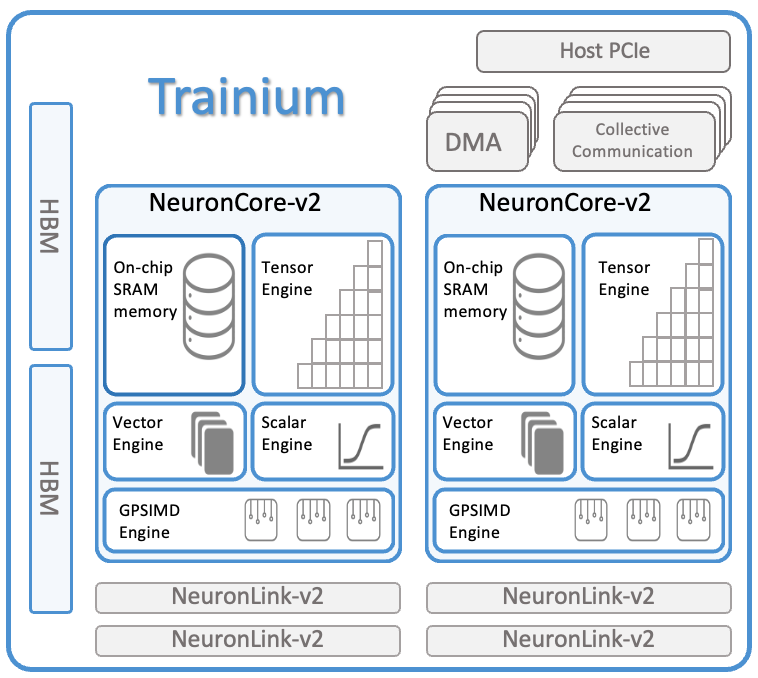
Key Features and Architecture
Each Trainium chip includes:
- Two NeuronCore-v2 processors delivering:
- 380 INT8 TOPS
- 190 FP16/BF16/cFP8/TF32 TFLOPS
- 47.5 FP32 TFLOPS
2. Minium 32 GiB of device memory with 820 GiB/sec bandwidth
2. 1 TB/sec DMA bandwidth with inline compression/decompression
4. NeuronLink-v2 interconnect for chip-to-chip communication
5. Dynamic shapes and control flow support
6. User-programmable rounding modes including stochastic rounding
Available Instance Types

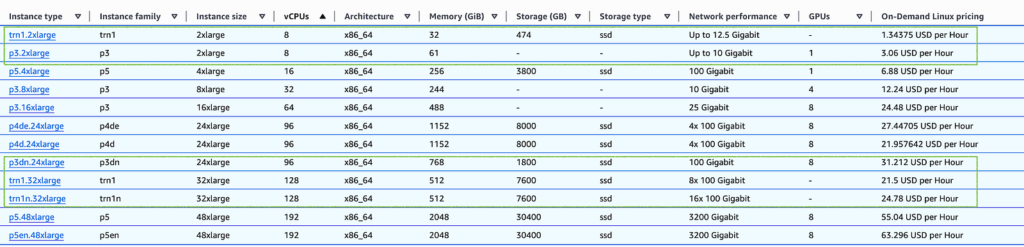
Trn1.2xlarge
- 1 Trainium chip
- 8 vCPUs, 32 GiB host memory
- Ideal for small model training and experimentation
Trn1.32xlarge:
- 16 Trainium chips
- 128 vCPUs, 512 GiB host memory
- 3,040 FP16/BF16/TF32 TFLOPS
- 800 Gbps EFA bandwidth
Trn1n.32xlarge:
- 16 Trainium chips
- Same compute as Trn1.32xlarge
- Enhanced networking with 1,600 Gbps EFA bandwidth
Key Benefits
- Up to 50% cost savings compared to other comparable EC2 instances (P4D, P3, P5 etc)
- Reduced training times for 100B+ parameter models
- Native framework support with PyTorch and TensorFlow through AWS Neuron SDK
- Scalability up to 6 exaflops with EC2 UltraClusters
- Memory pooling between chips for larger model capacity
Use Cases
Trainium is designed for:
- Training large language models (LLMs)
- Text summarization and code generation
- Question answering systems
- Image and video generation
- Recommendation engines
- Fraud detection models
- and many more
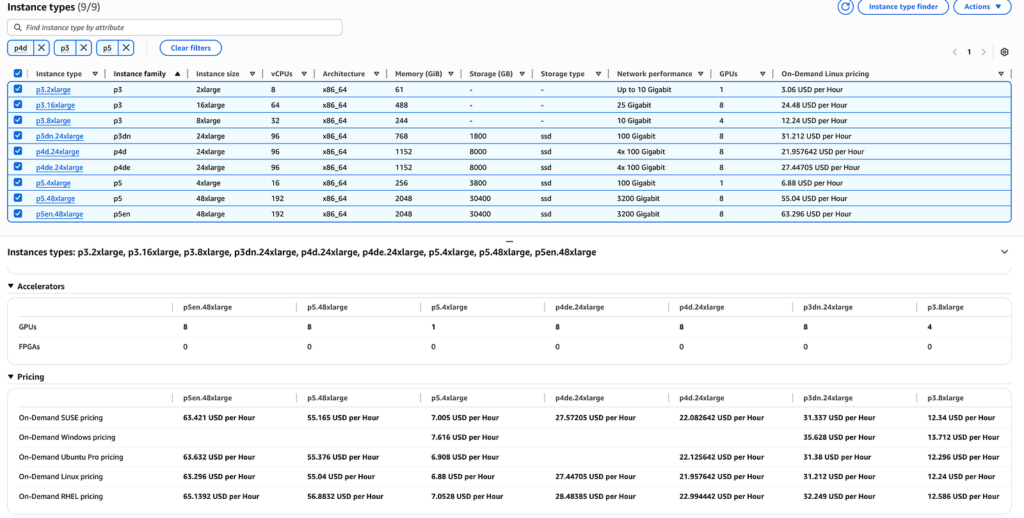
Likely Comparable GPU-Based Instance Categories
Based on the AWS’s machine learning instance portfolio, the “comparable GPU-based EC2 instances” likely include:
- P4d instances (NVIDIA A100 Tensor Core GPUs)
- P3 instances (NVIDIA V100 Tensor Core GPUs)
- P5 instances (NVIDIA H100 Tensor Core GPUs)
- Other GPU-optimized instances used for ML training
Trainium Reference Links
- https://awsdocs-neuron.readthedocs-hosted.com/en/latest/about-neuron/arch/neuron-hardware/trainium.html
- https://aws.amazon.com/ec2/instance-types/trn1/
- https://awsdocs-neuron.readthedocs-hosted.com/en/latest/_sources/about-neuron/arch/neuron-hardware/trn1-arch.rst
- https://awsdocs-neuron.readthedocs-hosted.com/en/latest/_sources/about-neuron/arch/neuron-hardware/trainium.rst
- https://awsdocs-neuron.readthedocs-hosted.com/en/latest/index.html?general%2Farch%2Fneuron-hardware%2Ftrn1-arch.rst=
- https://us-east-1.console.aws.amazon.com/sagemaker/home?region=us-east-1#/landing
- https://huggingface.co/docs/optimum-neuron/training_tutorials/fine_tune_bert
- https://aws.amazon.com/blogs/machine-learning/get-started-quickly-with-aws-trainium-and-aws-inferentia-using-aws-neuron-dlami-and-aws-neuron-dlc/
- https://aws.amazon.com/blogs/containers/train-llama2-with-aws-trainium-on-amazon-eks/
About AWS Inferentia
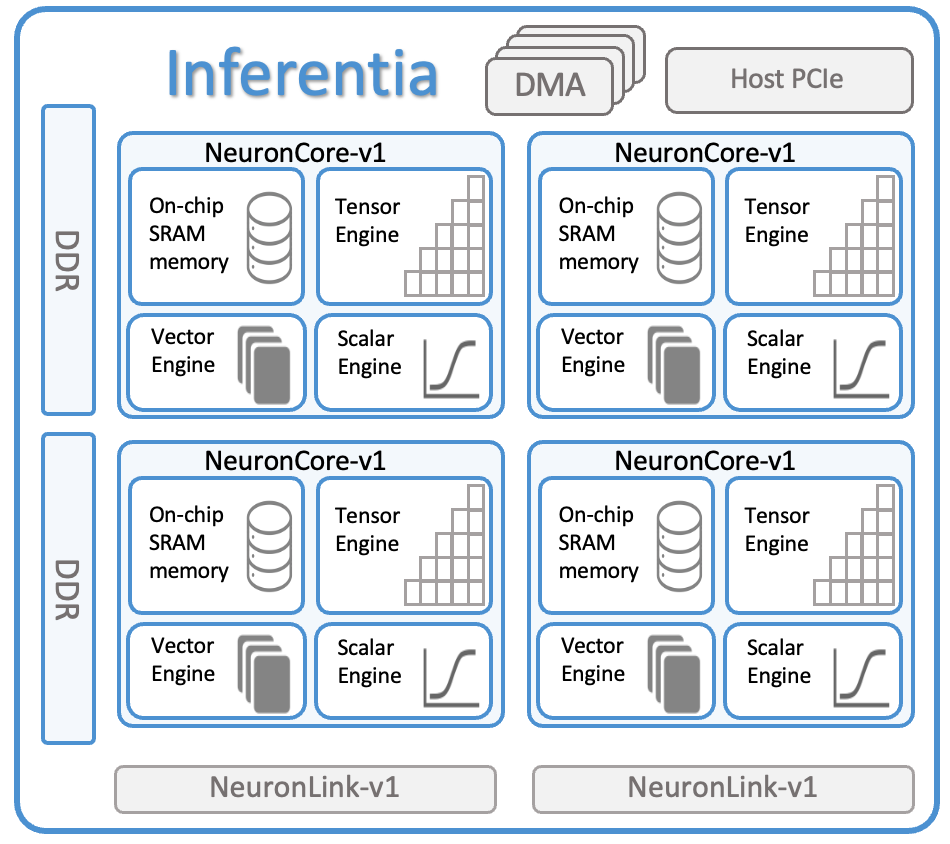
AWS Inferentia is Amazon’s custom-designed AI chip specifically built for machine learning inference (running trained AI models to make predictions). Think of it as a specialized processor that’s incredibly efficient at one thing: taking a trained AI model and using it to analyze new data quickly and cost-effectively.
Two Generations Available,
Inf1 Instances (First Generation)
- Powered by AWS Inferentia chips
- 1 chip, 4 vCPUs, 8 GB memory
Inf2 Instances (Second Generation)
- Powered by AWS Inferentia2 chips
- significantly more powerful than Inf1 instances
- 1 chip, 4 vCPUs, 16 GB memory

Performance Comparisons
Inf1 vs GPU Performance
- Up to 2.3x higher throughput than comparable GPU instances
- Up to 70% lower cost per inference than comparable GPU instances
- Optimized for models like BERT, ResNet, and other popular architectures
Inf2 vs Inf1 Performance:
- 4x higher throughput than Inf1
- 10x lower latency than Inf1
- 3x higher compute performance than Inf1
- 4x larger total accelerator memory than Inf1
Real-World Performance Examples
- Hugging Face: Saw up to 8x lower latency for BERT-like Transformers on Inf2 vs Inf1
- Leonardo.ai: Achieved 80% cost reduction without sacrificing performance
- NTT PC Communications: Saw 4.5x higher throughput, 25% lower latency, and 90% lower cost vs GPU instances
What Can You Run on Inferentia?
Supported Model Types
- Large Language Models (LLMs): GPT, BERT, T5, LLaMA
- Computer Vision: ResNet, EfficientNet, YOLO
- Recommendation Systems: Deep learning-based recommenders
- Natural Language Processing: Text classification, sentiment analysis
- Generative AI: Text generation, image generation models
Supported Frameworks
- PyTorch (native support)
- TensorFlow (native support)
- Hugging Face Transformers
- ONNX models
Inferentia Reference Links
- https://awsdocs-neuron.readthedocs-hosted.com/en/latest/about-neuron/arch/neuron-hardware/inferentia.html
- https://awsdocs-neuron.readthedocs-hosted.com/en/latest/about-neuron/arch/neuron-hardware/inf1-arch.html#
- https://awsdocs-neuron.readthedocs-hosted.com/en/latest/about-neuron/arch/neuron-hardware/inf2-arch.html
- https://aws.amazon.com/blogs/machine-learning/get-started-quickly-with-aws-trainium-and-aws-inferentia-using-aws-neuron-dlami-and-aws-neuron-dlc/
Both chips are useless without software to program them. The AWS Neuron SDK compiles models into executable graphs tailored to the hardware layout, and integrates natively with PyTorch and TensorFlow so you can continue using existing workflows. It results in higher throughput per watt than many traditional GPUs. Think of it like a translator — you write normal PyTorch code, and the Neuron SDK converts it to run optimally on the custom chips.
Use Trainium when building a model, use Inferentia when serving it to users at scale. Together they give AWS customers a complete, cost-optimized pipeline from model creation to production deployment — with costs significantly below what you’d pay renting Nvidia GPUs for the same work.

