
Introduction
If you work with multiple AWS CodeCommit repositories, cloning and migrating them manually can be tedious and time-consuming. Instead of copying each repository URL and running git clone multiple times, why not automate the process?
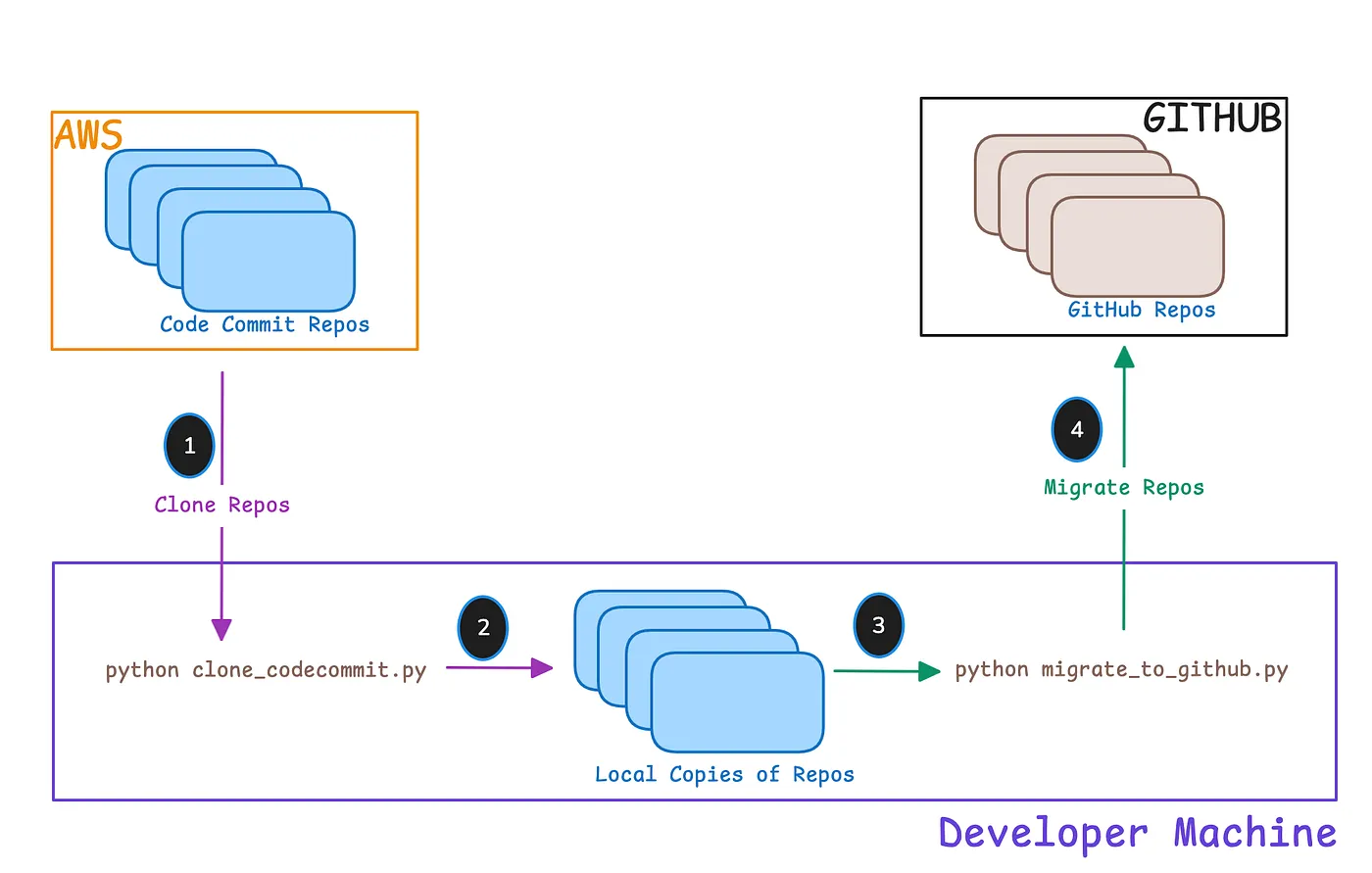
In this guide, I’ll walk you through a Python script that automates the cloning of all your AWS CodeCommit repositories and a script to migrate them to GitHub. This can be particularly useful for DevOps engineers, cloud architects, and software developers working with AWS.
Why Automate CodeCommit Cloning and Migration?
Use Cases
- New Developer Onboarding — When new developers join your team, they can set up their local environment quickly by cloning all repositories in one go.
- Disaster Recovery & Backup — Having a local copy of all repositories ensures quick recovery in case of accidental data loss.
- Multi-Account AWS Management — If you manage multiple AWS CodeCommit repositories across different accounts, this automation saves time and effort.
- Repository Migration — If you’re transitioning from AWS CodeCommit to GitHub, Bitbucket, or another source code repository, this script can help migrate your repositories quickly by cloning them and pushing them to the new platform.
Prerequisites
Before running the scripts, ensure you have the following setup:
- AWS CLI Installed: Download & Install AWS CLI
- Git Installed: Ensure git is installed on your system.
- Boto3 Installed: Install it using pip install boto3.
- AWS Credentials Configured: Run aws configure to set up your credentials.
- Create a .env File for Configuration: Store information such as AWS region and GitHub token in an environment file instead of hardcoding them in the script.
Python Script to Clone AWS CodeCommit Repositories
This Python script does the following:
- Connects to AWS CodeCommit using boto3
- Retrieves a list of all repositories
- Generates clone URLs
- Clones repositories into the current directory
- Uses a .env file to store configurations like AWS Region
Code Implementation
import boto3
import subprocess
import os
from dotenv import load_dotenv

# Load environment variables
load_dotenv()

region_name = os.getenv("AWS_REGION", "us-east-1")  # Default to us-east-1 if not set

# Initialize AWS CodeCommit client
client = boto3.client("codecommit", region_name=region_name)

# Get the list of repositories
def get_codecommit_repos():
    repos = []
    response = client.list_repositories()

    while True:
        repos.extend(response.get("repositories", []))
        if "nextToken" in response:
            response = client.list_repositories(nextToken=response["nextToken"])
        else:
            break
    return repos

# Clone repositories
def clone_repositories():
    repos = get_codecommit_repos()

    if not repos:
        print("No repositories found in AWS CodeCommit.")
        return

    for repo in repos:
        repo_name = repo["repositoryName"]
        clone_url = f"https://git-codecommit.{region_name}.amazonaws.com/v1/repos/{repo_name}"
        repo_path = os.path.join(os.getcwd(), repo_name)

        if os.path.exists(repo_path):
            print(f"Skipping {repo_name}, already exists.")
            continue

        print(f"Cloning {repo_name}...")
        subprocess.run(["git", "clone", clone_url], check=True)

# Execute cloning process
if __name__ == "__main__":
    clone_repositories()
Python Script to Migrate CodeCommit Repositories to GitHub
Once the repositories are cloned locally, you can push repos to GitHub using this script:
import subprocess
import os
from dotenv import load_dotenv

# Load environment variables
load_dotenv()

REPO_NAMES = [
    "tf-module-aws-asg"
    "tf-module-aws-ebs",
    "tf-module-aws-ec2",
    "tf-module-aws-vpc"
]

# GitHub Credentials
GITHUB_TOKEN = os.getenv("GITHUB_TOKEN")
ORG_NAME = os.getenv("GITHUB_ORG")
GIT_EMAIL = os.getenv("GIT_EMAIL")
GIT_USER_NAME = os.getenv("GIT_USER_NAME")
BRANCH_NAME = os.getenv("BRANCH_NAME")

# Base GitHub URL (HTTPS format)
GITHUB_URL_TEMPLATE = "https://oauth2:{token}@github.com/{org_name}/{repo}.git"

# Function to execute shell commands
def run_command(command, cwd=None):
    result = subprocess.run(command, cwd=cwd, shell=True, capture_output=True, text=True)
    if result.returncode == 0:
        print(f"Success: {command}")
    else:
        print(f"Error: {command}\n{result.stderr}")

# Loop through each repo and execute commands
for repo in REPO_NAMES:
    repo_path = os.path.join(os.getcwd(), repo)

    if not os.path.exists(repo_path):
        print(f"Skipping {repo}: Directory does not exist!")
        continue

    print(f"\nProcessing repository: {repo}")

    # Set Git remote URL
    git_remote_url = GITHUB_URL_TEMPLATE.format(token=GITHUB_TOKEN, org_name=ORG_NAME, repo=repo)
    run_command(f"git remote set-url origin {git_remote_url}", cwd=repo_path)

    # Set Git user configuration
    run_command(f"git config --local user.email \"{GIT_EMAIL}\"", cwd=repo_path)
    run_command(f"git config --local user.name \"{GIT_USER_NAME}\"", cwd=repo_path)

    # Push code to remote repository
    run_command(f"git push origin {BRANCH_NAME}", cwd=repo_path)

print("\nAll repositories processed!")
How to Use
- Create a .env file and add the following lines:
AWS_REGION=us-east-1
GITHUB_TOKEN=your_github_token
GITHUB_ORG=your_github_org_name
GIT_EMAIL=your_email@example.com
GIT_USER_NAME=your_github_username- Save the scripts as clone_codecommit.py and migrate_to_github.py
- Run the cloning script:
python clone_codecommit.py- Run the migration script:
python migrate_to_github.py- The repositories will be cloned and migrated to GitHub.
I’ve incorporated the details about the two Python scripts but these can be optimized or merged into a single python file as needed.
Conclusion
This automation simplifies the process of managing AWS CodeCommit repositories, saving time and effort. Whether you’re onboarding new developers, managing multiple AWS accounts, setting up CI/CD pipelines, or migrating repositories, this solution can significantly enhance productivity.
If you found this guide helpful, feel free to share it with your network and follow me for more automation tips. Happy Learning!

