
Introduction
Managing security groups across a large AWS organization can quickly become overwhelming. As teams grow, accounts multiply, and resources sprawl across regions, maintaining consistent and compliant network security configurations becomes a significant challenge. This is where AWS Firewall Manager steps in — offering centralized, policy-driven control over Amazon VPC security groups across your entire AWS organization.
In this article, I’ll explore what Firewall Manager security group policies are, the three distinct policy types available, how each works in practice, and the best practices you should follow to get the most out of this powerful service.
What Is AWS Firewall Manager?
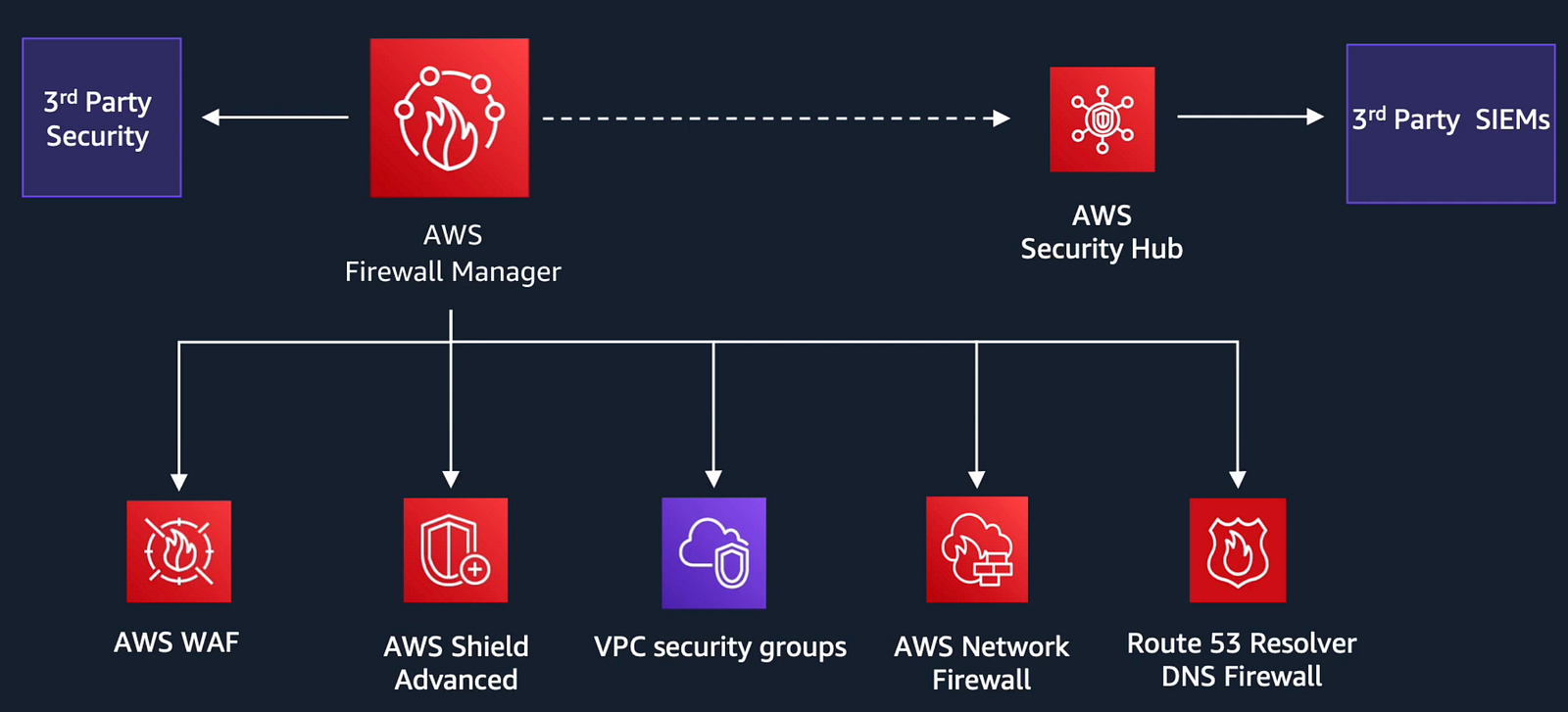
AWS Firewall Manager is a security management service that allows you to centrally configure and manage firewall rules and security policies across all accounts and resources in your AWS Organization. It works seamlessly with AWS Organizations and continuously monitors your environment, automatically applying policies to new accounts and resources as they are added or updated.
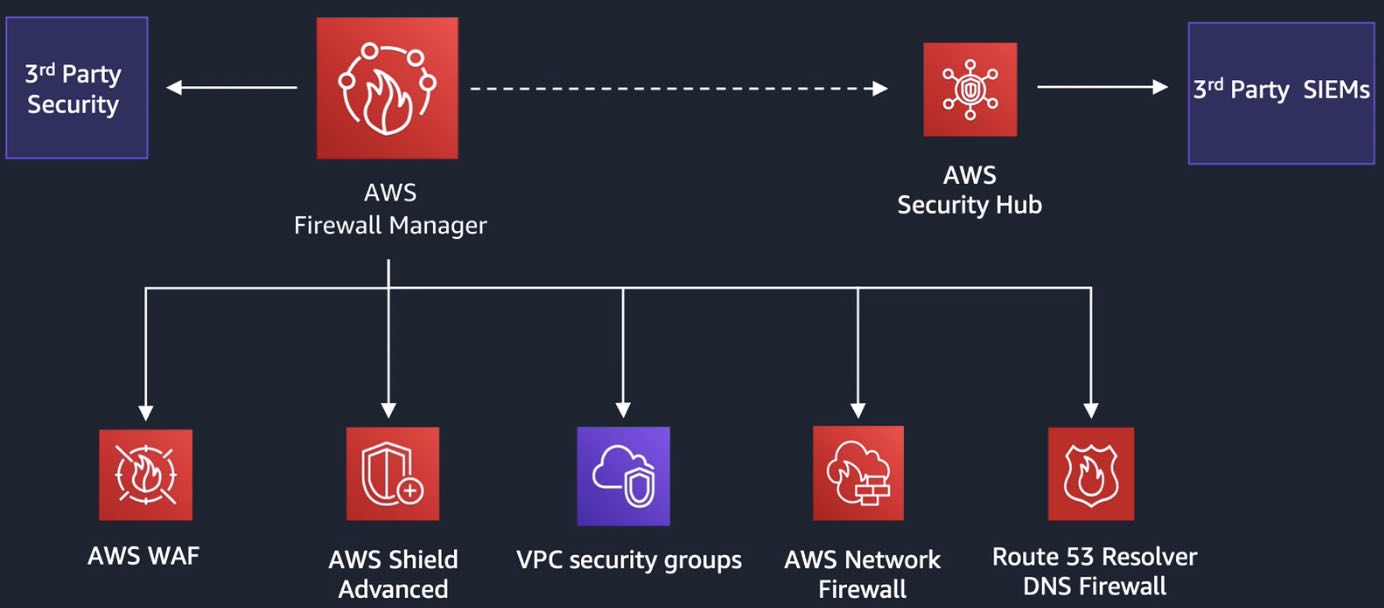
Firewall Manager supports AWS WAF, AWS Shield Advanced, AWS VPC Security Groups, AWS Network Firewall and Route53 Resolver DNS Firewall — Security group policies stand out as a foundational capability for controlling traffic at the VPC level.
Prerequisites for Using Firewall Manager Security Group Policies
Before configuring any Firewall Manager policies, ensure the following prerequisites are in place:
- AWS Organizations must be enabled with all features turned on.
- An AWS Firewall Manager administrator account must be designated from the management account of the organization.
- AWS Config must be enabled in all accounts and regions where Firewall Manager will operate.
- All member accounts must be in the Firewall Manager organization scope.
The Three Types of Security Group Policies
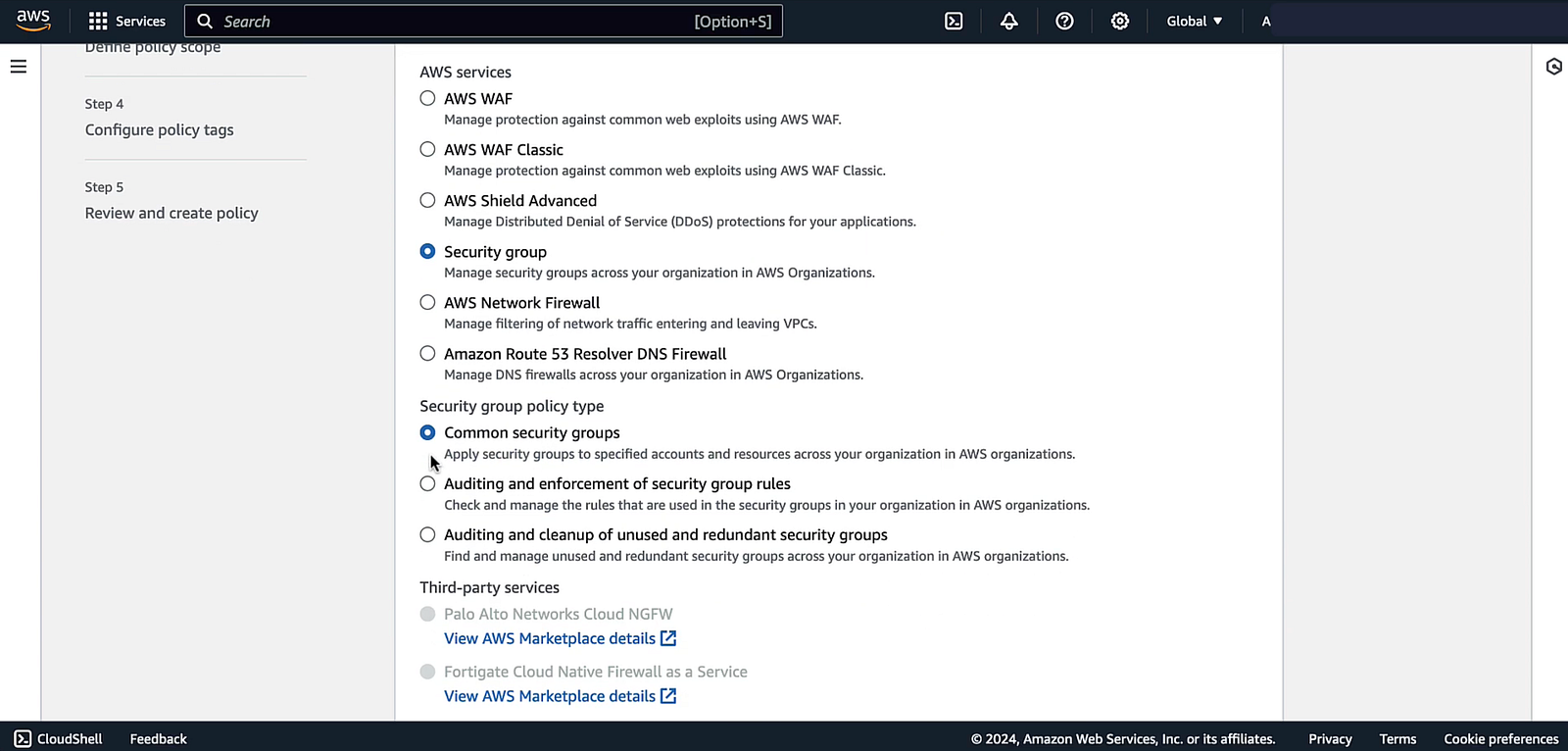
Firewall Manager offers three distinct security group policy types, each serving a different purpose in your security governance model.
1. Common Security Group Policies
A common security group policy provides centrally controlled association of security groups to accounts and resources across your organization. Think of it as a “push” mechanism — the Firewall Manager administrator defines one or more primary security groups, and Firewall Manager replicates and associates them to the in-scope resources automatically.
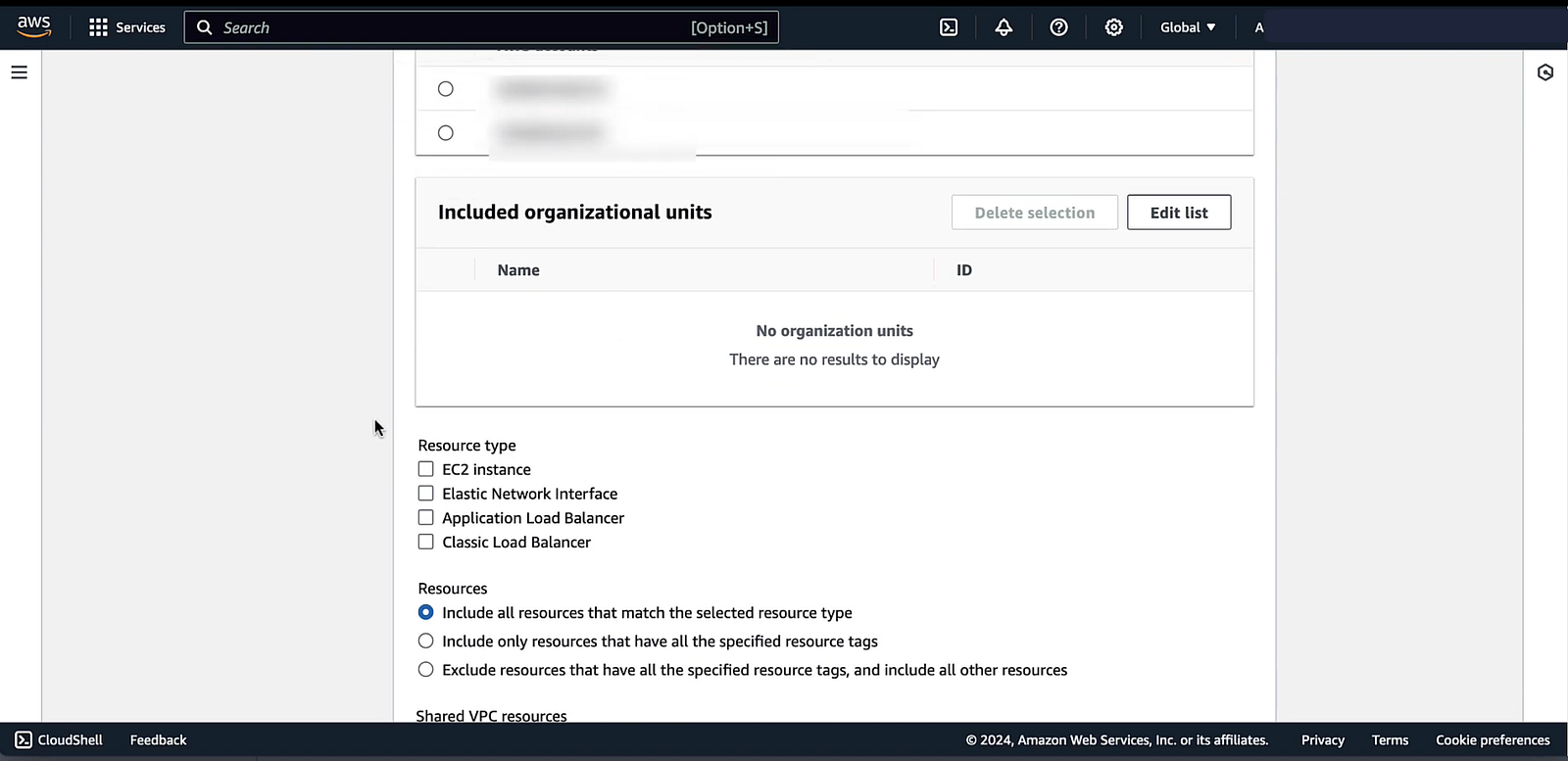
Supported resource types:
- Amazon EC2 instances
- Elastic Network Interfaces (ENIs)
- Application Load Balancers
- Classic Load Balancers
How it works:
The Firewall Manager administrator account creates the primary security groups. Firewall Manager then replicates these into every in-scope account’s VPCs and associates the replicas with the target resources. If rules in the primary security group change, those changes automatically propagate to all replicas.
Key configuration options include:
- Change control reporting: Firewall Manager can identify and report any local modifications made to replica security groups, helping you detect configuration drift.
- Exclusive association: You can instruct Firewall Manager to disassociate any other security groups from in-scope resources, ensuring only the centrally managed group is attached.
- Tag distribution: Tags from the primary security group can be distributed to all replicas — though note that system tags with the aws: prefix are never distributed.
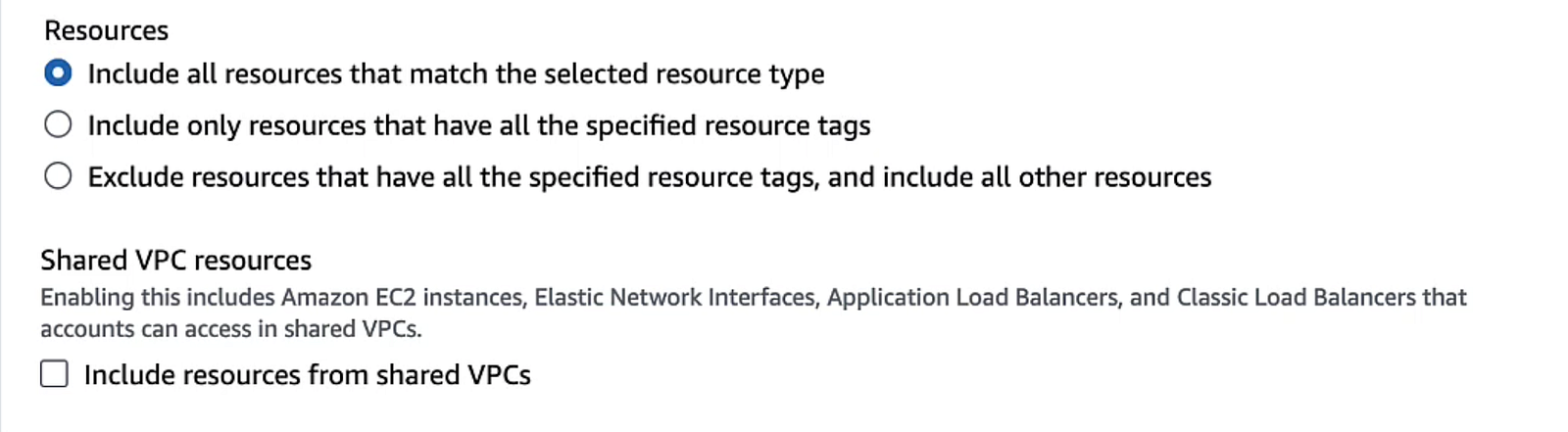
Shared VPC support: Common security group policies can also cover shared VPCs — VPCs owned by one account but shared with others. When enabled, Firewall Manager replicates the primary security group once for each in-scope account the VPC is shared with, which can result in multiple replicas within a single VPC.
2. Content Audit Security Group Policies
While common security group policies enforce what security groups should be applied, content audit security group policies focus on the rules inside security groups — auditing whether those rules comply with your organizational standards.
These policies apply to all customer-created security groups in use across the organization and can flag or automatically remediate non-compliant rules.
Supported resource types:
- Amazon EC2 instances
- Elastic Network Interfaces
- Amazon VPC security groups directly
Two approaches to defining audit rules:
- Managed policy rules: Firewall Manager uses application and protocol lists — either AWS-managed or custom ones you define — to evaluate which security group rules are compliant. This gives you fine-grained control over which protocols and port ranges are allowed or denied.
- Custom policy rules: You designate an existing security group in the administrator account as an audit security group. This group acts purely as a reference template — it is never attached to any actual resource. You then configure whether rules matching the audit group should always be considered compliant (allow mode) or always non-compliant (deny mode).

Content audit policies are especially useful for enforcing organizational-wide standards, such as preventing rules that allow unrestricted inbound traffic (0.0.0.0/0) on sensitive ports like SSH (22) or RDP (3389).
Automatic remediation can be enabled to have Firewall Manager automatically update non-compliant rules — but it is strongly recommended to start with remediation disabled, review the findings first, and only enable remediation once you are confident in the policy’s scope and impact.
3. Usage Audit Security Group Policies
Over time, AWS environments accumulate security groups that are no longer needed, security groups that were created for a project and never cleaned up, or duplicates that crept in through manual processes. Usage audit security group policies address this problem by identifying and optionally cleaning up unused and redundant security groups.
Supported resource type:
- Amazon VPC security groups
Detecting redundant security groups:
Two or more security groups are considered redundant if they have exactly the same rule set and reside in the same VPC. When Firewall Manager finds a redundant set, it selects one group to keep, migrates all resource associations to that group, and disassociates the rest — effectively making the duplicates unused and eligible for removal.
Detecting unused security groups:
A security group is considered unused when it is not associated with any EC2 instance or ENI, and Firewall Manager has not received a configuration item for it within a configurable time period (default: 0 minutes, maximum: 365 days). The configurable time window is useful when you create security groups in advance of the resources they’ll be attached to.
Best Practices
Getting the most out of Firewall Manager security group policies requires careful planning. Here are the key best practices recommended by AWS:
- Exclude the Firewall Manager administrator account from policy scope. The administrator account should manage policies, not be subject to them. When using the console, this is the default behavior for usage audit policies.
- Start with automatic remediation disabled. Whether working with content audit or usage audit policies, always begin by reviewing the compliance findings before enabling auto-remediation. A misconfigured policy with auto-remediation enabled can have unintended consequences across your entire organization.
- Avoid conflicts with external security group management tools. If you use Terraform, CloudFormation, or a third-party tool to manage security groups alongside Firewall Manager, be cautious. Conflicting configurations between Firewall Manager auto-remediation and external tooling can create remediation loops — each side continuously undoing the other’s changes. Use resource tagging to exclude externally managed security groups from Firewall Manager policies, and similarly exclude Firewall Manager-managed groups from your external tooling.
- For usage audit policies, avoid rapid association changes. Making multiple changes to a security group’s association status within a short window (e.g., 15 minutes) can cause Firewall Manager to miss some events and produce inaccurate compliance assessments.
If you found this article helpful, please consider liking, sharing, and following me for more AWS deep-dive content.

