
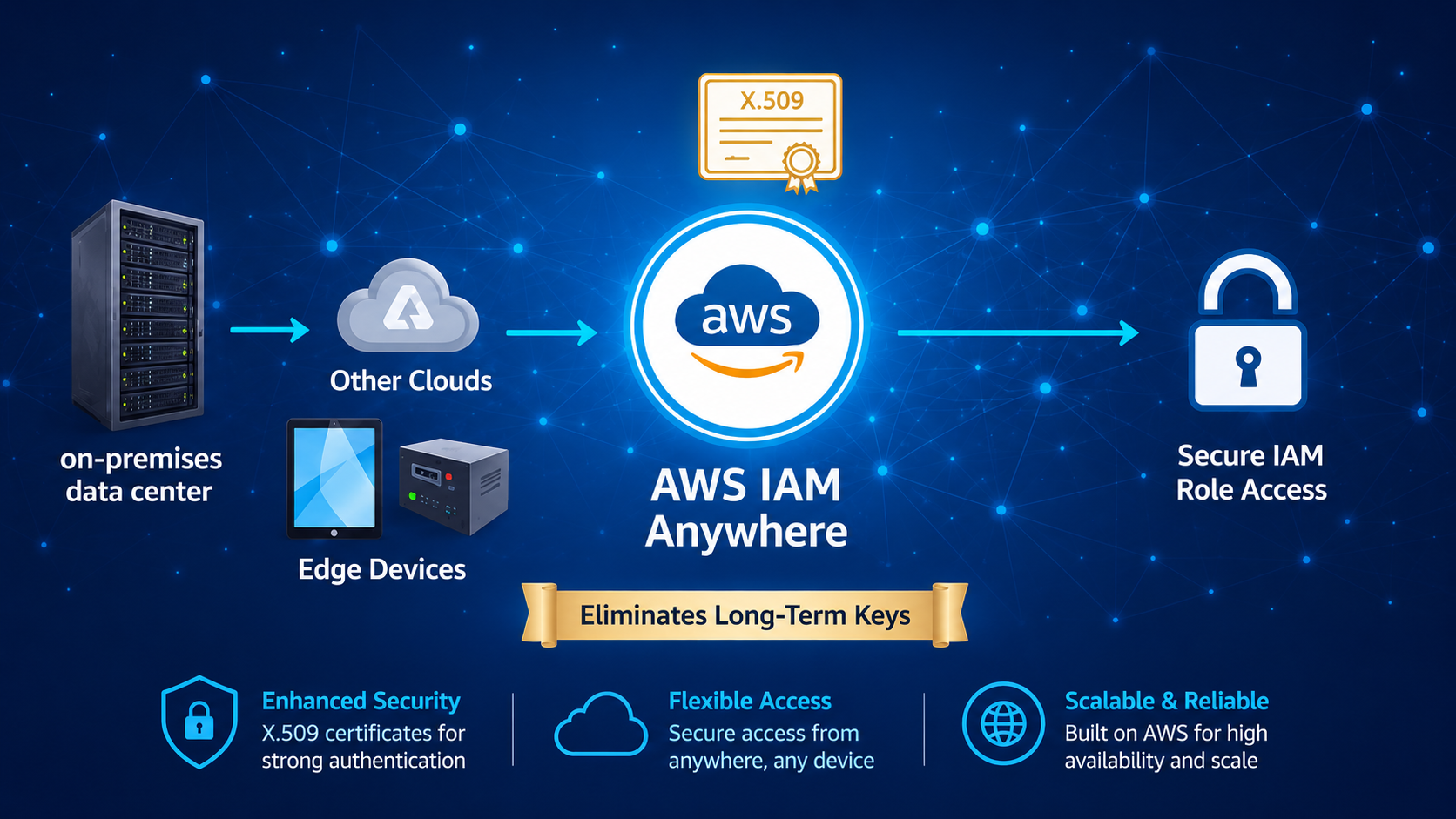
AWS IAM Roles Anywhere is an AWS Identity and Access Management (IAM) feature that allows workloads running outside of AWS (on-premises, other clouds, edge locations, or devices) to securely assume IAM roles using X.509 certificates, instead of long-term AWS access keys.
Key characteristics
- Uses public key infrastructure (PKI) and X.509 certificates
- Issues temporary AWS credentials via STS
- Eliminates the need to store long-lived IAM user access keys outside AWS
- Works for non-AWS compute environments
Before This Service, What Was the Solution in AWS?
Before IAM Roles Anywhere, AWS did not have a native service for non-AWS workloads to assume IAM roles directly.
Common AWS-native approaches used earlier
IAM Users with Access Keys
- Create an IAM user
- Generate Access Key ID and Secret Access Key
- Store them on on-prem servers or apps
Security risk (long-lived credentials)
STS AssumeRole with Static Credentials
- IAM user used to call sts:AssumeRole
- Still required long-term credentials to bootstrap
Custom Federation via SAML / OIDC
- Mostly designed for human users, not machine workloads
- Complex for service-to-service authentication
Conclusion:
There was no first-class AWS solution for secure, certificate-based authentication for external workloads.
Cloud Provider Alternatives
- Azure Managed Identity
- GCP Workload Identity existed
AWS lacked equivalent for non-AWS workloads
Why Do We Have IAM Roles Anywhere Now?
AWS introduced IAM Roles Anywhere to address:
- Growing hybrid cloud architectures
- Increased adoption of multi-cloud
- Security best practice: zero trust + short-lived credentials
- Customer demand for AWS-native identity for external workloads
- This aligns AWS with:
- Azure Managed Identities
- GCP Workload Identity Federation
What Problem Does It Solve?
Core Problems Solved:
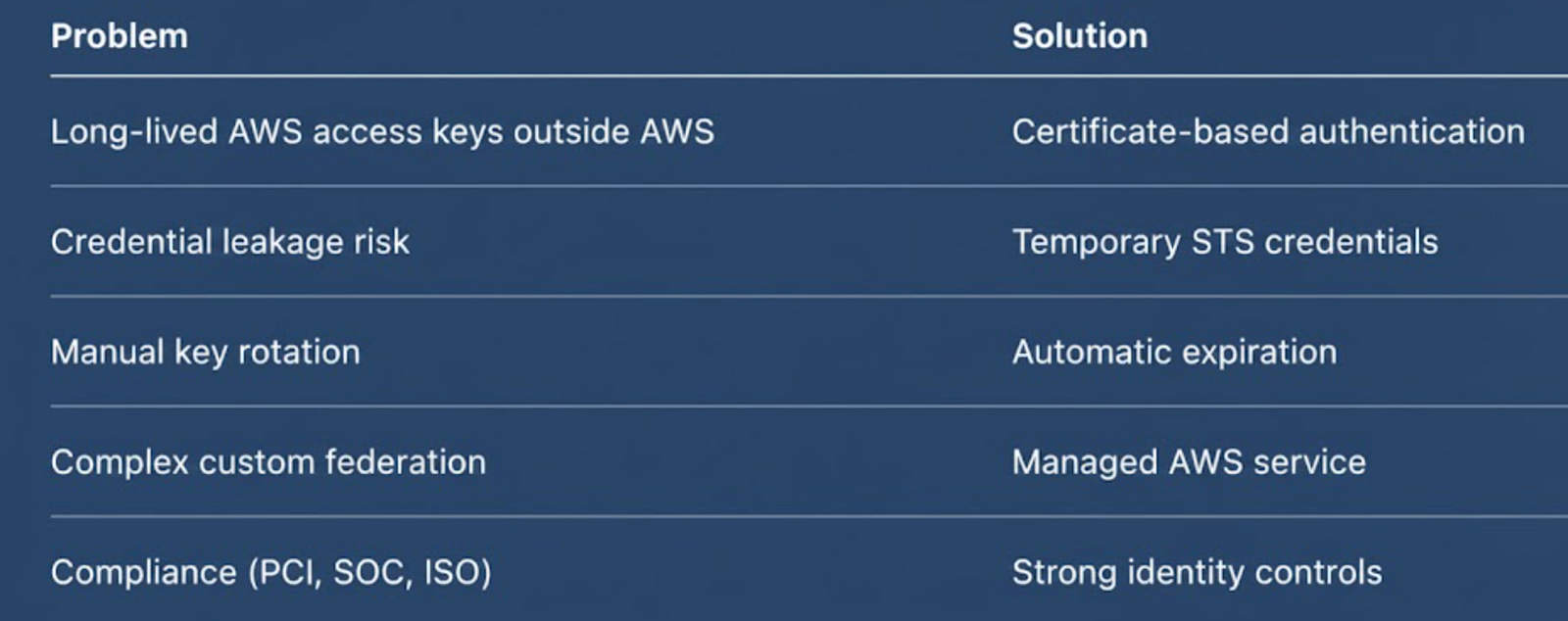
AWS IAM Roles Anywhere Key Components
Trust Anchor
- Represents a trusted certificate authority (CA)
- Can be:
- Self-managed root CA
- Enterprise CA
- AWS Private CA
- AWS validates client certificates against the Trust Anchor
IAM Role
- Standard IAM role
- Trust policy explicitly allows rolesanywhere.amazonaws.com
- Permissions defined via IAM policies
Profile
- Logical mapping between:
- Trust Anchor
- One or more IAM Roles
- Controls:
- Session duration
- Which roles external workloads may assume
X.509 Certificate
- Installed on external workload
- Contains:
- Public key
- Subject / identity metadata
- Corresponding private key never leaves workload
AWS Roles Anywhere Credential Helper
- CLI utility provided by AWS
- Handles:
- Certificate authentication
- STS calls
- Credential rotation
- Outputs credentials compatible with AWS SDKs
Domain Solutions
A. Banking & Financial Services
Use Case:
- Core banking apps running on-prem
- Regulatory restrictions prevent cloud migration
Solution:
- On-prem apps authenticate using X.509 certs
- Assume IAM roles to:
- Access S3 for reports
- Push data to Kinesis
- Invoke AWS APIs securely
Benefits:
- No static secrets
- Meets PCI-DSS & RBI security requirements
- Full CloudTrail auditing
B. Financial Trading / Risk Systems
Use Case:
- Low-latency trading engines in private data centers
- Need AWS analytics and ML services
Solution:
- Use IAM Roles Anywhere to access:
- Amazon S3
- Athena
- SageMaker endpoints
Benefits:
- Short-lived credentials reduce blast radius
- No dependency on human IAM users
C. Telecom
Use Case:
- OSS/BSS systems running in telecom data centers
- Network probes & monitoring agents
Solution:
- Each system gets its own certificate
- Role-based access to:
- CloudWatch
- S3
- DynamoDB
Benefits:
- Per-device identity
- Easy revocation if a device is compromised
- Scales to thousands of nodes
Implementation Steps
1. AWS Console
Step 1: Create a Trust Anchor
- IAM → Roles Anywhere
- Create Trust Anchor
- Name: enterprise-root-ca
- Source type: Certificate Bundle
- Upload Root CA certificate (X.509) rootCA.pem
Step 2: Create an IAM Role
- IAM → Roles
- Trusted entity type: Custom trust policy
{
  "Version": "2012-10-17",
  "Statement": [
    {
      "Effect": "Allow",
      "Principal": {
        "Service": "rolesanywhere.amazonaws.com"
      },
      "Action": "sts:AssumeRole"
    }
  ]
}- Attach required policies (AmazonS3ReadOnlyAccess, etc.)
Step 3: Create a Profile
- IAM Roles Anywhere → Profiles
- Create Profile
- Profile name: onprem-app-profile
- Associate IAM role(s)
- Associate Trust Anchor
- Set session duration (e.g., 1 hour)
- Define session duration
Step 4: Configure External Workload
- Install AWS Roles Anywhere credential helper
curl -o aws_signing_helper https://rolesanywhere.amazonaws.com/releases/latest/linux_amd64/aws_signing_helper
chmod +x aws_signing_helper- Configure AWS CLI Credential Process
Create or update ~/.aws/config:
[profile rolesanywhere]
credential_process = /path/aws_signing_helper credential-process \
  --certificate /path/workload.crt \
  --private-key /path/workload.key \
  --trust-anchor-arn arn:aws:rolesanywhere:... \
  --profile-arn arn:aws:rolesanywhere:... \
--role-arn arn:aws:iam::ACCOUNT:role/MyRole- Validate Access
aws sts get-caller-identity --profile rolesanywhere2. AWS CLI
- Create Trust Anchor
aws rolesanywhere create-trust-anchor \
  --name my-trust-anchor \
--source sourceType=CERTIFICATE_BUNDLE,sourceData=@rootCA.pem- Create IAM Role
> Create a file named rolesanywhere-trust-policy.json:
{
  "Version": "2012-10-17",
  "Statement": [
    {
      "Effect": "Allow",
      "Principal": {
        "Service": "rolesanywhere.amazonaws.com"
      },
      "Action": "sts:AssumeRole"
    }
  ]
}
This trust policy explicitly allows AWS IAM Roles Anywhere to assume the role.
> Create IAM role
aws iam create-role \
  --role-name RolesAnywhereExternalWorkloadRole \
  --assume-role-policy-document file://rolesanywhere-trust-policy.json \
  --description "IAM role for external workloads using IAM Roles Anywhere"
> Attach policy to IAM role
aws iam attach-role-policy \
  --role-name RolesAnywhereExternalWorkloadRole \
  --policy-arn arn:aws:iam::aws:policy/AmazonS3ReadOnlyAccess
> Verify role configuration
aws iam get-role \
--role-name RolesAnywhereExternalWorkloadRole- Create Profile
aws rolesanywhere create-profile \
  --name my-profile \
--role-arns arn:aws:iam::123456789012:role/MyRole- Obtain Credentials (External Host)
aws_signing_helper credential-process \
  --certificate cert.pem \
  --private-key key.pem \
  --trust-anchor-arn  \
  --profile-arn  \
  --role-arn
Interview Questions and Answers
What is AWS IAM Roles Anywhere?
A service that allows workloads outside AWS to assume IAM roles using X.509 certificates and receive temporary credentials.
How is it different from IAM users?
IAM users use long-lived credentials, while IAM Roles Anywhere uses short-lived STS credentials and certificates.
What AWS service issues the temporary credentials?
No. It enables external workloads to assume existing IAM roles.
Does IAM Roles Anywhere replace IAM roles?
No. It is designed for machine-to-machine workloads.
What is a Trust Anchor?
A Trust Anchor defines the root CA or certificate authority that AWS trusts to validate client certificates.
Is it suitable for human authentication?
No. It is designed for machine-to-machine workloads.
Additional Interview Questions
- How do we design role-per-application vs role-per-environment using IAM Roles Anywhere?
- Should we use a single Trust Anchor or multiple Trust Anchors across environments (dev/test/prod)?
- How do we segregate access when multiple external workloads share the same CA?
- How do we map certificate attributes (CN, SAN) to workload identity and ownership?
- What is the recommended session duration for high-frequency vs low-frequency workloads?
- Can multiple IAM roles be associated with a single Roles Anywhere profile, and when is that advisable?
- How do we design for multi-account AWS access using IAM Roles Anywhere?
- Should IAM Roles Anywhere be placed in a central security account
- How does IAM Roles Anywhere fit into a zero-trust architecture?
- What are the failure modes if the Trust Anchor is deleted or misconfigured?
- How is private key protection enforced on external systems?
- What is the blast radius if a certificate is compromised?
- How quickly can access be revoked in an incident?
- What monitoring should be in place for unusual
AssumeRolepatterns - How do we detect certificate misuse across multiple workloads?
- Does IAM Roles Anywhere support certificate revocation lists (CRLs) directly?
- How do we enforce least privilege across Roles Anywhere profiles?
- Can session tags be used with IAM Roles Anywhere for ABAC (attribute-based access control)?
- How do we prevent a single certificate from being reused across environments?
- What are the audit implications if multiple workloads share the same certificate?
- What is the certificate rotation strategy, and how is it automated?
- How do we manage certificate expiry across thousands of workloads?
- How do we test certificate renewal without production impact?
- What is the operational overhead compared to IAM users?
- How do we perform blue-green certificate rollout?
- How do we handle disaster recovery scenarios if the CA is unavailable
- How do we ensure consistency between AWS roles and certificate issuance?
- What happens to running workloads when temporary credentials expire?
- How do we version and manage Roles Anywhere profiles?
- How do we validate configuration drift over time?
- Does IAM Roles Anywhere meet PCI-DSS requirements for credential management?
- How does it help satisfy SOC 2 and ISO 27001 controls?
- How do we demonstrate auditor evidence for access revocation?
- Where are authentication and authorization events logged?
- How do we implement segregation of duties with PKI and IAM teams
- Can IAM Roles Anywhere be aligned with enterprise identity governance tools?
- What data is logged in CloudTrail for Roles Anywhere events?
- How long should audit logs be retained?
- How do we ensure non-repudiation for external workloads?
- What controls prevent shadow IT certificate issuance?
- What is the maximum supported scale of certificates and profiles?
- How does STS throttling impact large-scale workloads?
- What is the latency impact of certificate-based authentication?
- Can workloads cache credentials safely?
- How does Roles Anywhere behave under burst traffic?
- Are there regional dependencies or failover considerations?
- How does the solution scale compared to Vault-based approaches?
- What are best practices for reducing STS calls?
- Is there a cost impact at high scale?
- How do we test scale safely?
- Is IAM Roles Anywhere billed separately?
- What indirect costs exist (PKI, operations)?
- How does cost compare with Secrets Manager–based approaches?
- Is AWS Private CA required, and what is its cost implication?
- How do we justify ROI to leadership?
- Are there hidden costs at scale?
- How does cost change in multi-account setups?
- Is there any licensing dependency?
- What cost optimization strategies apply?
- How do we forecast usage?

