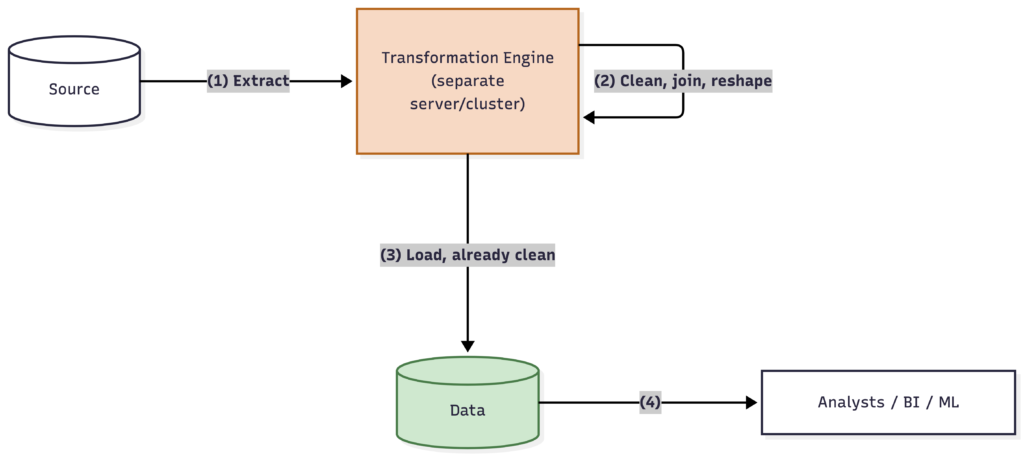
ETL (Extract, Transform, Load) transforms data before loading it into storage.
ELT (Extract, Load, Transform) loads raw data first and transforms it afterward, inside the destination system.
The difference is about where and when the cleanup happens — and it’s one of the biggest shifts in how data engineering is practiced over the last decade.
Why It Matters
This isn’t just an ordering trick with three letters. It reflects a real shift in where the computing “muscle” for transforming data lives, and it affects your
Architecture,
Team’s skillset, and
Cost structure
If you’re leading a team and you hear engineers debating
“Should this go through dbt after loading, or should we transform it in the pipeline first?”
this is the underlying question. Knowing the tradeoffs lets you weigh in credibly instead of deferring entirely.
ETL: Extract, Transform, Load
The traditional approach, dominant for decades before cloud data warehouses became cheap and powerful.
How it works:
Extract — pull raw data from the source system
Transform — clean, join, and reshape the data outside the destination, typically on a separate processing server
Load — write the final, already-clean data into the destination (a data warehouse)
Why it existed: Data warehouses used to be expensive and limited in processing power. It made sense to do the heavy transformation work elsewhere, and only load the warehouse with finished, ready-to-query data.
Tradeoffs:
Keeps the destination lean and clean — no raw, messy data cluttering the warehouse
Requires a separate transformation engine/server, adding infrastructure to maintain
If your transformation logic has a bug, you often have to re-extract from the source to fix it — the raw data was never kept
Historically slower to change, since transformation logic lives outside the warehouse and often in specialized ETL tools
ELT: Extract, Load, Transform
The modern default for most cloud-based data teams.
How it works:
Extract — pull raw data from the source system
Load — write the raw, untransformed data directly into the destination (a modern cloud warehouse or lakehouse)
Transform — do the cleaning, joining, and reshaping inside the destination itself, using its own compute power
Why it took over: Cloud data warehouses (Snowflake, BigQuery, Databricks, Redshift) became powerful and cheap enough to handle heavy transformation workloads themselves. Combined with tools like dbt, which let engineers write transformations as version-controlled SQL that runs directly in the warehouse, ELT became simpler to build and maintain than classic ETL.
Tradeoffs:
Raw data is preserved in the warehouse — if a transformation has a bug, you fix the logic and re-run it against data you already have, no need to go back to the source
Transformation logic can live in SQL, version-controlled like software, which most data teams find easier to test and collaborate on
The destination needs to be powerful enough to handle transformation workloads — not a problem for modern cloud warehouses, but a real constraint on older systems
Raw, unprocessed data sitting in your warehouse means you need clear conventions (like the medallion architecture’s Bronze/Silver/Gold layers) so people don’t accidentally query messy raw tables
ELT generally assumes you’re comfortable storing raw data alongside transformed data, which is exactly what the medallion architecture is designed to organize cleanly.
Re-run transformation against already-loaded raw data
Which Should You Use?
For a new project on a modern cloud warehouse, ELT is the default choice for most teams today – it’s simpler, more debuggable, and plays well with version-controlled, SQL-based transformation tools like dbt.
ETL still has valid use cases: strict compliance environments that require scrubbing sensitive data before it ever lands in a shared warehouse, or legacy on-prem systems that simply can’t handle heavy in-warehouse transformation.
If your team is starting fresh, default to ELT and only reach for classic ETL when you have a specific compliance or infrastructure constraint that requires it.
Where Should the Transform Layer Actually Live?
There’s a question hiding inside both ETL & ELT diagrams above that’s easy to skip past: where, physically and organizationally, does that transformation compute run? On the same infrastructure as everything else, or somewhere deliberately separated?
This matters more than it looks like at first glance, especially once you’re leading a team responsible for security, cost, and compliance — not just code.
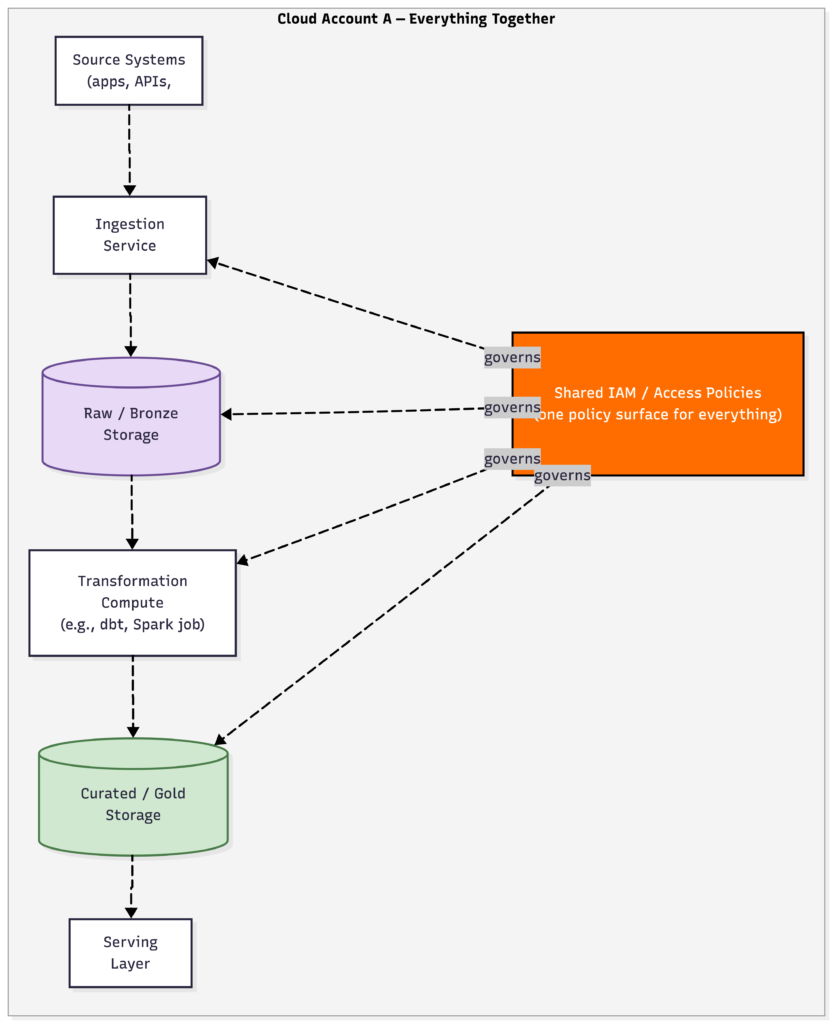
Option 1: Same Cloud Account / Same Infrastructure
The simplest setup: ingestion, raw storage, transformation compute, and the serving layer all live in one cloud account (or one on-prem environment), typically managed by one platform team.
Advantages:
Lowest operational overhead — one place to monitor, patch, and manage access
No cross-account networking to configure (no VPC peering, no cross-account IAM roles)
No data egress costs from moving data between accounts/regions
Faster to build, easier for a small team to reason about end-to-end
Downsides:
Weak blast radius containment — if the transformation layer is compromised or misconfigured, it often has a path to everything else in the same account, including raw sensitive data
Harder to enforce strict separation of duties (e.g., “only the compliance team’s tooling can touch raw PII”)
All workloads share the same billing bucket, making cost attribution across teams or business units harder
This is a perfectly reasonable default for a small team, an early-stage project, or data that isn’t especially sensitive.
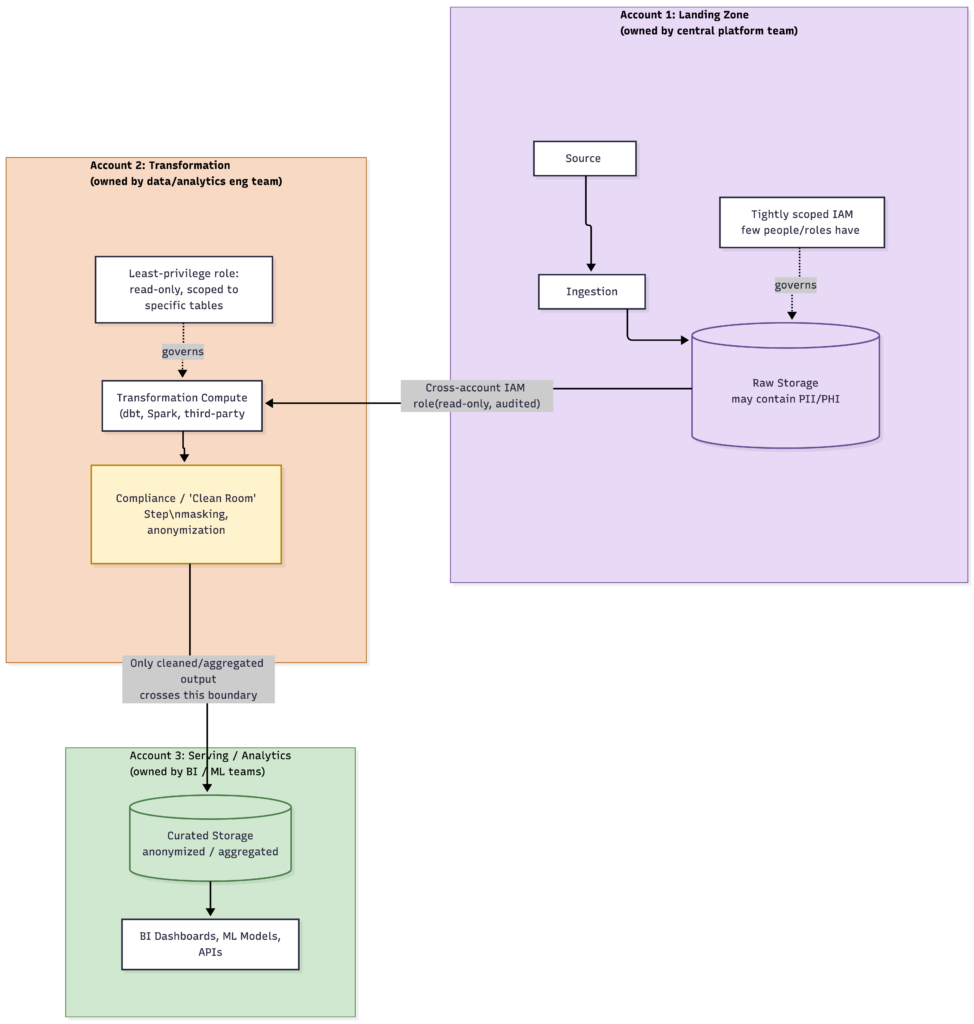
Option 2: Separate Cloud Account for Transformation (or for Raw Data)
A common pattern at larger organizations:
raw ingestion lands in one account (sometimes called a “landing zone”),
transformation compute runs in a second account, and the
curated/serving layer lives in a third
with tightly scoped cross-account access between them.
Why teams do this – the real reasons, not just “best practice”:
Security blast radius reduction. If your transformation layer uses a third-party tool, a custom Spark cluster, or code written by a less-trusted team, isolating it in its own account means a compromise there doesn’t automatically expose the raw data account or the serving layer.
Compliance boundaries. Regulations like HIPAA or GDPR often require that systems handling PII/PHI sit inside a specifically controlled, auditable boundary. Isolating the transform step that touches raw sensitive fields into a dedicated, compliance-scoped account – and only allowing anonymized or aggregated output to cross into the general analytics account — is a common “clean room” pattern.
Governance and least-privilege. A central platform team might own the raw landing account with very tight access, while individual domain teams (in a data-mesh style setup) own their own transformation accounts with permissions scoped only to what they need – nobody outside the platform team can touch raw data directly.
Cost attribution / chargeback. Separate accounts make it trivial to see exactly what each team or business unit’s transformation workloads cost, instead of everything landing in one shared bill.
Blast radius for outages, not just breaches. A runaway transformation job that spikes compute costs or hits a quota limit in its own account won’t take down ingestion or serving for everyone else.
Multi-tenant isolation. If you’re processing data on behalf of multiple clients or business units, separate accounts per tenant (or per sensitivity tier) keep their data and compute cleanly walled off from each other.
The real cost of this isolation:
Cross-account IAM roles and resource policies to configure and maintain
Networking complexity (VPC peering, PrivateLink/Private Service Connect, or cross-account data-sharing features like Snowflake’s data sharing or AWS Lake Formation cross-account grants)
Potential data egress costs and added latency when data crosses account or region boundaries
More surface area to monitor, audit, and patch – you now have multiple accounts instead of one
Contains information related to marketing campaigns of the user. These are shared with Google AdWords / Google Ads when the Google Ads and Google Analytics accounts are linked together.
90 days
__utma
ID used to identify users and sessions
2 years after last activity
__utmt
Used to monitor number of Google Analytics server requests
10 minutes
__utmb
Used to distinguish new sessions and visits. This cookie is set when the GA.js javascript library is loaded and there is no existing __utmb cookie. The cookie is updated every time data is sent to the Google Analytics server.
30 minutes after last activity
__utmc
Used only with old Urchin versions of Google Analytics and not with GA.js. Was used to distinguish between new sessions and visits at the end of a session.
End of session (browser)
__utmz
Contains information about the traffic source or campaign that directed user to the website. The cookie is set when the GA.js javascript is loaded and updated when data is sent to the Google Anaytics server
6 months after last activity
__utmv
Contains custom information set by the web developer via the _setCustomVar method in Google Analytics. This cookie is updated every time new data is sent to the Google Analytics server.
2 years after last activity
__utmx
Used to determine whether a user is included in an A / B or Multivariate test.
18 months
_ga
ID used to identify users
2 years
_gali
Used by Google Analytics to determine which links on a page are being clicked
30 seconds
_ga_
ID used to identify users
2 years
_gid
ID used to identify users for 24 hours after last activity
24 hours
_gat
Used to monitor number of Google Analytics server requests when using Google Tag Manager