
Almost every data pipeline decision starts with choosing one of these two or blending both
This is usually the first real architectural decision a data engineer makes on any new pipeline, and it has downstream consequences for cost, complexity, and how “fresh” data can be.
Get it wrong and one of two things happens:
As a lead/architect, this is a question worth asking early in any project scoping conversation:
how fresh does this data actually need to be?
The answer determines a huge amount of architecture, team skill requirements, and infrastructure cost – often before a single line of code is written.
Batch processing collects data over a period of time and processes it all at once, on a schedule like hourly, nightly, weekly.
How it works: Data accumulates in a source system throughout the day. At a scheduled time (say, 2 AM), a job wakes up, pulls all the new/changed data, transforms it, and loads it into its destination.
Good fit for:
Tradeoffs:
Streaming processing handles data continuously, as each individual event happens – a click, a sensor reading, a transaction.
How it works: Instead of waiting for a scheduled job, a streaming system processes each record or small “micro-batch” of records within seconds or milliseconds of it being generated, often via a message queue like Apache Kafka feeding a stream processor like Apache Flink.
Good fit for:
Tradeoffs:
Ask
If this data were an hour late, would it actually matter?
Most business reporting, historical analysis, and internal dashboards can tolerate “an hour late” or even “a day late” just fine.
Genuinely time-critical use cases – fraud, safety alerts, live pricing etc requires real-time data processing.
In practice, most mature data platforms use both, for different pipelines depending on the use case — not one architecture-wide decision. Two common patterns:
Lambda architecture runs a batch pipeline for accuracy/completeness alongside a separate streaming “speed layer” for low-latency approximate results, then reconciles the two.
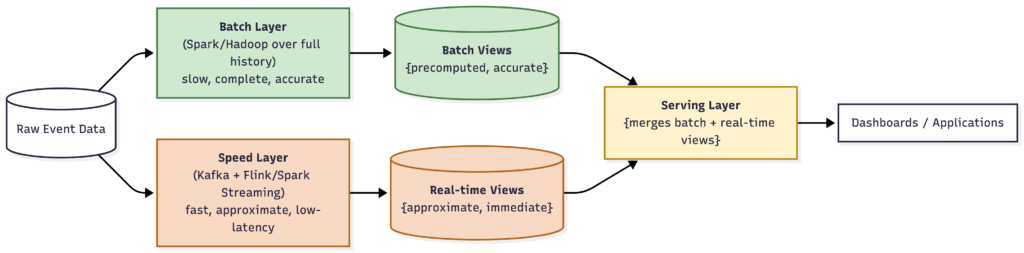
The same raw data feeds two parallel pipelines. The batch layer is slow but eventually accurate; the speed layer is fast but only approximate. The serving layer merges both — showing the real-time view immediately, then quietly correcting it once the batch layer’s accurate numbers catch up.
Kappa architecture — treats everything as a stream, including reprocessing historical data by replaying it through the same streaming pipeline, avoiding the need to maintain two separate codebases.
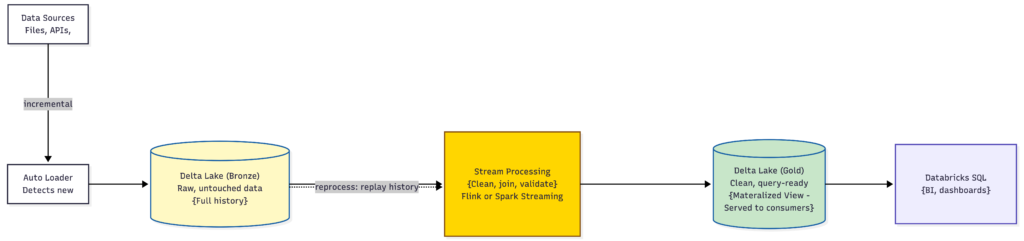
Only one pipeline exists. When transformation logic changes or history needs to be recomputed, the same streaming job simply replays the event log from an earlier point — there’s no separate batch codebase to keep in sync.
A practical rule of thumb for a new team: default to batch. It’s simpler, cheaper, and easier to hire for. Only reach for streaming when a specific, named business requirement genuinely demands sub-minute freshness – not because it sounds more modern.
Here’s how the batch-vs-streaming question plays out inside businesses you already use every day — notice that the same company uses both, just for different parts of the product.
| Use case | Batch or Streaming? | Why |
|---|---|---|
| Live order tracking (“your rider is 4 minutes away”) | Streaming | The entire value of this feature is sub-second location updates. An hour-late location is worthless. |
| Delivery partner–order matching | Streaming | Assigning the nearest available rider has to happen in real time as orders and rider locations change every second. |
| Surge pricing during rain or peak dinner hours | Streaming | Prices need to reflect live demand/supply imbalance right now, not last night’s numbers. |
| Monthly restaurant payout reconciliation | Batch | Restaurants get paid on a schedule, not instantly per order – a nightly or weekly batch job comparing orders to payouts is perfectly fine and much simpler to audit. |
| “Which cuisines are trending in this city” reports for expansion planning | Batch | This is strategic analysis using weeks or months of historical data – freshness of the last hour adds nothing. |
| Use case | Batch or Streaming? | Why |
|---|---|---|
| Fraud detection at checkout | Streaming | A fraudulent transaction has to be caught before it completes — checking it tomorrow means the money’s already gone. |
| “Only 2 left in stock” inventory display | Streaming | Inventory counts change constantly across warehouses; showing a stale count leads to overselling. |
| Product recommendations updating as you browse | Streaming | The “customers who viewed this also viewed…” panel needs to react to this session’s behavior, not yesterday’s. |
| End-of-day sales and revenue reports for finance | Batch | Finance teams work on daily/weekly cycles — a nightly batch job is simpler, cheaper, and entirely sufficient. |
| Personalized weekly email campaigns | Batch | Building “here’s what we think you’ll like this week” doesn’t need to run every second — a nightly or weekly batch job is the norm. |
| Use case | Batch or Streaming? | Why |
|---|---|---|
| Rider-driver matching and live ETA | Streaming | The core product experience depends entirely on real-time location and availability data. |
| Dynamic (surge) pricing | Streaming | Same logic as food delivery surge pricing — has to reflect current demand, not historical averages. |
| Monthly driver earnings statements | Batch | Drivers get paid weekly/monthly; a scheduled batch job reconciling trips to payouts is standard and sufficient. |
| City-level demand forecasting for driver incentive planning | Batch | This uses historical trip patterns over weeks/months to plan incentive budgets — not a real-time need. |