
If you are coming from a traditional software engineering background, both spark.sql() and %sql appear to do the same thing : execute SQL on Spark. Technically they do, but they intended for different use cases.
Think of them as:
spark.sql() = SQL executed from Python code
%sql = SQL executed directly by the notebook%sql
SELECT * FROM customerNotebook SQL cell -> Spark SQL Engine -> ResultsHere you directly interact with Spark SQL and Databricks automatically displays a result grid. As resulted dataframe variable does not exists so we can do any further processing on data. It is meant for immediate availability.
dataframe = spark.sql("""
SELECT * FROM customer
""")Python code -> spark.sql() -> Spark SQL Engine -> Spark DataFrame -> Further ProcessingHere SQL is just one step inside a Python program and Databricks will not display the grid or data automatically as it is controlled code now. to display data on terminal you need to add a line
display(dataframe)and this output is identical to %sql output. But with spark.sql() we can continue data processing further which is not the case with %sql.
dataframe = dataframe.filter("customer_id > 1")
or
dataframe = dataframe.filter("status = 'ACTIVE'")You receive a DataFrame object so further processing is applicable and this is the main reason production pipeline often prefer spark.sql().
Suppose today’s partition changes.
%sql
SELECT * FROM customer
WHERE load_data = '2026-01-01'Here date is hardcoded.
run_date = "2026-01-01"

df = spark.sql(f"""
SELECT * from customer
WHERE load_date = '{run_date}'
""")
Here date is part of the variable.
For enterprise pipelines where dates, environments, schemas, and table names change dynamically, Python becomes extremely useful.
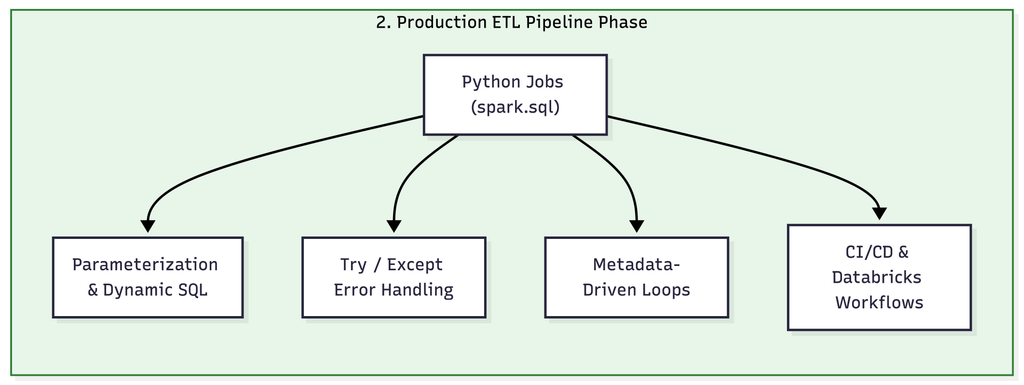
One of the biggest advantages of spark.sql() is the ability to combine Spark SQL logic with Python’s programmatic control structures, such as loops, conditional statements, and functions. This unlocks metadata-driven processing, where pipeline logic adapts dynamically based on external configurations or database catalog metadata.
Imagine you need to load and process 100 raw staging tables into target Delta tables.
Instead of writing 100 individual %sql queries manually:
# Define a list of tables (or fetch dynamically from a metadata catalog/config table)
tables_to_process = ["customers", "orders", "payments", "products"]

source_schema = "staging_db"
target_schema = "processed_db"

for table in tables_to_process:
    print(f"Processing table: {table}")

    # Dynamically construct SQL queries inside a loop
    spark.sql(f"""
        CREATE OR REPLACE TABLE {target_schema}.{table} AS
        SELECT *, CURRENT_TIMESTAMP() AS processed_at
        FROM {source_schema}.{table}
        WHERE is_active = true
""")When using standard SQL cells (%sql), any error will immediately break and halt the entire notebook cell execution. Because %sql lacks programmatic control, you cannot catch exceptions or log custom failure messages cleanly.
%sql
INSERT INTO customer
SELECT * FROM staging_customerBy contrast, wrapping queries inside spark.sql() with Python error handling (try…except) allows your data pipelines to gracefully manage failures without crashing the entire job.
try:
    print("Attempting to execute query...")

    # Intentionally executing a query or table transformation
    df = spark.sql("""
        SELECT customer_id, name, total_amount
        FROM staging_db.daily_sales
    """)

    # Perform write operation
    df.write.format("delta").mode("append").saveAsTable("processed_db.daily_sales")
    print("Pipeline executed successfully!")

except Exception as e:
    # Catch any Spark SQL or PySpark exceptions
    print(f"Error encountered during SQL execution: {e}")

    # Log failure to an error log table or trigger an alert notification
    spark.sql(f"""
        INSERT INTO audit_db.pipeline_logs (status, error_message, log_time)
        VALUES ('FAILED', '{str(e)[:100]}', CURRENT_TIMESTAMP())
    """)

finally:
    # Optional cleanup step that always runs regardless of success or failure
print("Processing step completed.")Using %sql isolates your data inside Spark SQL environment cells.
By contrast, using spark.sql() returns a Spark DataFrame that acts as a bridge between distributed SQL processing and the vast ecosystem of Python data science and analytical libraries (such as Pandas, NumPy, Matplotlib, and Seaborn).
import matplotlib.pyplot as plt

# 1. Query large dataset in Spark SQL
df_spark = spark.sql("""
    SELECT category, SUM(revenue) AS total_revenue
    FROM sales_db.transactions
    GROUP BY category
""")

# 2. Convert Spark DataFrame to Pandas for local, lightweight handling
df_pandas = df_spark.toPandas()

# 3. Leverage Python libraries for custom data visualization
plt.figure(figsize=(8, 5))
plt.bar(df_pandas['category'], df_pandas['total_revenue'], color='skyblue')
plt.title('Total Revenue by Category')
plt.xlabel('Category')
plt.ylabel('Revenue ($)')
plt.xticks(rotation=45)
plt.tight_layout()

# Render plot in Databricks
plt.show()%sql
CREATE OR REPLACE TABLE silver_customer
AS SELECT * FROM bronze_customer;
CREATE OR REPLACE TABLE gold_customer
AS SELECT * FROM silver_customer;this works perfectly and a lot of Databricks engineers build SQL-based ETL this way.
While %sql cells are convenient for interactive data exploration and quick prototyping, enterprise data engineering requires robust, automated pipelines. Using spark.sql() within Python allows you to build complete Extract, Transform, Load (ETL) workflows that combine parameters, data quality checks, conditional logic, and target writes into a single cohesive script.
from pyspark.sql.functions import current_timestamp

def run_daily_etl(execution_date: str, env: str = "prod"):
    print(f"Starting ETL Pipeline for Date: {execution_date} in [{env}] environment...")

    # 1. EXTRACT: Query staging data dynamically based on the execution date
    extract_query = f"""
        SELECT
            transaction_id,
            customer_id,
            amount,
            status,
            transaction_date
        FROM {env}_raw.raw_transactions
        WHERE transaction_date = '{execution_date}'
    """
    raw_df = spark.sql(extract_query)

    # 2. TRANSFORM: Perform quality checks and transformations using PySpark & SQL
    # Clean invalid records
    cleaned_df = raw_df.filter("amount > 0 AND status = 'COMPLETED'")

    # Register temporary view for further SQL transformations
    cleaned_df.createOrReplaceTempView("temp_cleaned_transactions")

    transformed_df = spark.sql("""
        SELECT
            transaction_id,
            customer_id,
            amount,
            UPPER(status) AS status,
            transaction_date,
            CURRENT_TIMESTAMP() AS loaded_at
        FROM temp_cleaned_transactions
    """)

    # 3. LOAD: Append transformed data into the target Delta table
    target_table = f"{env}_analytics.fact_transactions"

    transformed_df.write \
        .format("delta") \
        .mode("append") \
        .saveAsTable(target_table)

    print(f"Successfully processed and loaded {transformed_df.count()} records into {target_table}.")

# Execute the pipeline for a specific date batch
run_daily_etl(execution_date="2026-01-01", env="prod")This is extremely common in Databricks.
Sharing views between execution languages in Databricks:
df = spark.read.table("customer")
df.createOrReplaceTempView("customer_temp")%sql
SELECT * FROM customer_temp%sql
CREATE OR REPLACE TEMP VIEW active_customer
AS
SELECT * FROM customer WHERE status='ACTIVE'df = spark.table("active_customer")
Databricks allows both styles to work together.
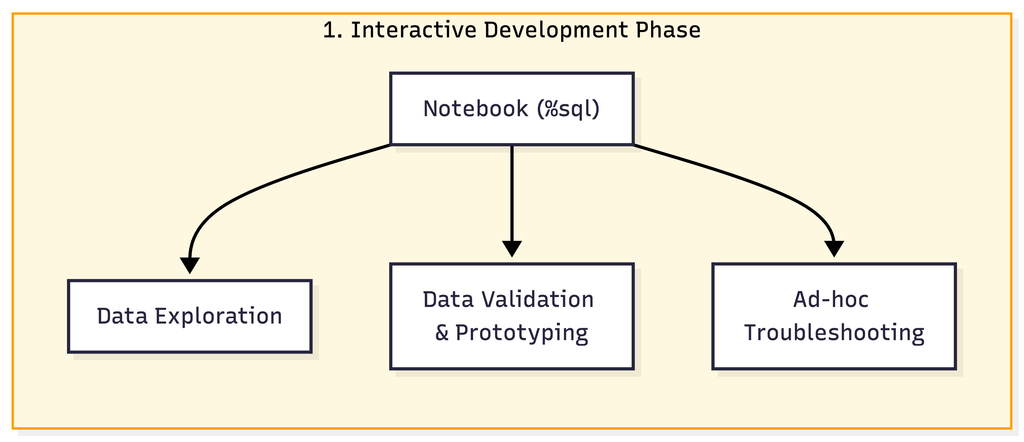
In enterprise Databricks projects, the typical pattern is:
Notebook -> %sqlused for
Workflows -> Python Files -> spark.sql()Used for:
Simple Rule to Remember
Use %sql when your goal is
“I want to query the data.”
Use spark.sql() when your goal is
“I want to build an application or pipeline around the query.”