
Data ingestion is the process of bringing data from a source or different system into organization data platform. There are four common patterns for doing this,
and most real pipelines use a mix of them depending on where the data lives and how fast it needs to arrive.
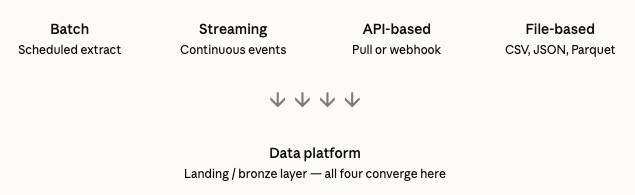
Before any transformation, modeling, or analysis can happen, data has to actually get into organization platform. How it gets in shapes everything downstream:
A lot of new data engineers reach for the same ingestion pattern for everything because it’s the one they know best. Understanding all four gives you the flexibility to pick the right one per source – which is exactly what mature data platforms do, source by source, rather than forcing every pipeline through one method.
Pulling a chunk of data on a schedule – every hour, every night, every week.
How it works: A scheduled job connects to the source (often a database), extracts everything new or changed since the last run, and loads it into the destination.
Best for: Data that doesn’t need to be fresher than “a few hours old” – financial reconciliation, historical reporting, nightly syncs from operational databases.
Watch out for: As data volume grows, batch jobs can start taking longer than the gap between runs (an hourly job that takes 90 minutes to run is a ticking time bomb).
Bringing data in continuously, the instant it’s generated – one event, one row, one message at a time.
How it works: Events are published to a message queue (like Apache Kafka) the moment they happen, and consumers process them immediately or within seconds. Change Data Capture (CDC) Explained is one of the most common ways streaming ingestion is implemented against a database source.
Best for: Fraud detection, live dashboards, real-time personalization – anything where “an hour late” genuinely defeats the purpose (see Batch vs. Streaming Processing for the full decision framework).
Watch out for: Significantly more operational complexity – you’re now running always-on infrastructure that needs monitoring, not a job that runs and finishes.
Pulling or receiving data through an API, typically from a third-party service you don’t control the underlying database for.
How it works: Either your pipeline calls a vendor’s REST API on a schedule to pull data e.g., pulling ad performance data from a marketing platform, or the vendor pushes data to your API via a webhook the moment something happens e.g., a payment provider notifying you the instant a transaction completes.
Best for: SaaS tools and third-party platforms where you have no direct database access e.g., CRMs, marketing platforms, payment processors, support ticket systems.
Watch out for: Rate limits, pagination, API versioning changes breaking pipeline without warning, and needing to handle authentication/token refresh reliably.
Reading data that arrives as files like CSV, JSON, Parquet, Excel – typically dropped into a shared location like an SFTP server or cloud storage bucket.
How it works: A file lands (manually or via an automated export from another system), and a job detects the new file and processes it. Tools like Databricks Auto Loader are built specifically to detect and incrementally process new files as they arrive, rather than needing to be told a file exists.
Best for: Legacy system integrations, partner/vendor data exchanges, bulk exports from systems with no API or database access, one-off historical backfills.
Watch out for: No guarantee about format consistency between files e.g., a partner can silently change a column order or add a new field), and needing clear conventions for what happens to a file once it’s processed (archive it? delete it? what if the same file gets uploaded twice?).
| Company / Scenario | Ingestion method used | Why |
|---|---|---|
| Swiggy/Zomato — restaurant menu updates from partner restaurants | File-based | Many smaller restaurant partners submit menu updates as spreadsheet exports rather than through an API integration — a file-drop pattern is the lowest-friction option for them. |
| Swiggy/Zomato — live order status changes | Streaming (via CDC) | Order status changes need to reach the tracking UI within seconds, not the next batch cycle. |
| Amazon — pulling advertising performance data from an external ad platform | API-based | Amazon doesn’t have direct database access to a third-party ad platform’s data — it has to go through that platform’s API, typically pulled on a schedule. |
| Amazon — nightly seller payout reconciliation | Batch | Payout reconciliation runs on a daily cycle; there’s no benefit to processing this continuously. |
| A bank — receiving daily transaction files from a partner bank for reconciliation | File-based | Interbank data exchange still very commonly happens via secure file transfer (SFTP) rather than direct API/database integration, often for legacy and security reasons. |
| A bank — real-time fraud scoring on incoming transactions | Streaming | Fraud has to be caught before the transaction completes — this is the streaming/CDC pattern from the previous article. |